A Customer Support Link-Safety Policy: How to Share URLs Customers Can Trust
A proposed team workflow for approving, explaining and reviewing links in customer conversations, with organization-defined steps for uncertain or unusable URLs.
Why link-sharing rules matter in customer support
A link in a support conversation asks a customer to leave the conversation and take an action elsewhere. A team-defined policy can help operators explain that action and handle uncertain destinations consistently.
The workflow below is a policy example, not a security standard or a guarantee that a destination is safe. Adapt it to your organization’s processes and have the appropriate internal owners approve it. Do not rely on a preview—or on a support platform—to prove where a link leads or whether it is safe.
- Define which destinations are approved for each support task.
- Explain the link’s purpose before sharing it.
- Set a clear internal route for questions or exceptions.

Define approved destinations and ownership
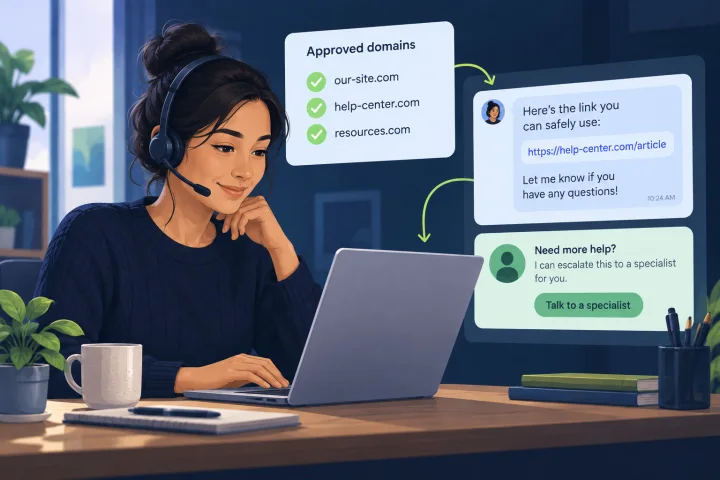
As a team policy choice, maintain a short, accessible list of destinations approved for support tasks—for example, account help, payment, returns, or document submission. For each entry, identify its purpose and the internal owner responsible for approving changes.
A suggested review step is to compare the destination with the approved entry before sending it. If the destination is unclear or differs from what the list specifies, pause and use your organization’s designated internal review route rather than relying on an old saved message.
- Record each approved destination, its supported task, and its internal owner.
- Use current links or templates for recurring support tasks.
- Define who can approve a new destination or a change.

Explain the link before sharing it
A useful team convention is to put a plain-language explanation immediately before the URL. Say why you are sharing it, what the customer should do there, and whether they should expect to sign in or provide information. Avoid promises about what a third-party page will display.
For example: “Use our returns page to start a return. It will ask for your order number.” This gives more context than “Click here.” If the next step is unclear or does not match the approved purpose, follow your organization’s review process before sharing the link.
- Name the task in the link text or nearby sentence.
- State when a link is optional or unavailable, if that applies.
- Keep instructions brief and relevant to the support task.
Set team rules for unusual links and sensitive information
Your organization may choose to treat shortened URLs, unfamiliar or lookalike domains, unexpected redirects, and links containing unexpected information as reasons to pause for review. These patterns alone do not establish that a link is malicious; define how operators should handle them in your own policy.
A team policy can also specify which destinations and requests are approved when a task involves sensitive information. For example, it can tell agents not to ask customers to send passwords or one-time codes in chat, and to use the organization’s designated process when a URL appears to contain personal or access information.
- Do not treat a familiar logo, preview, or sender name as proof that a destination is approved.
- Avoid editing a URL to make it look simpler; use a current, approved link or ask the designated owner.
- Define an internal process for handling sensitive links and information.
Offer an alternative when a link is inaccessible
A team may choose to offer another route when a customer cannot open a link or prefers not to use it. Depending on your organization’s approved options, that could mean explaining the steps in the conversation, providing another support route, or arranging a human handoff.
Keep the alternative within your organization’s established process. Do not pressure customers to provide extra personal information simply to work around an unusable link.
- Explain the task in the link text or nearby sentence.
- Offer an approved alternative and ask whether the customer would prefer it.
- Do not advise customers to bypass a browser warning or use an unverified replacement link.
Use one stop-and-review process for link concerns
To avoid different responses across conversations, define one internal process for uncertain, reported, or unusable links. As a suggested rule, operators should pause before sharing a destination they cannot confirm, then ask the designated lead or team to review it using an approved internal route. The policy should also say how to record the issue without unnecessarily reposting a sensitive URL.
If a customer reports using a questionable page, direct the case through your organization’s incident process. The organization’s designated team should provide any account-protection instructions through a known official route. For a link that simply does not work, use the approved alternative described in your policy.
- Name the internal contact or team for review and escalation.
- Specify how to report the issue and handle potentially sensitive URLs.
- Give agents a customer-facing response and an approved alternative for unusable links.
Make the policy repeatable in everyday support
Keep the policy short enough to use during a live conversation. A checklist beside the approved-destination list can help operators follow the organization’s chosen process without having to interpret every case alone. Assign an owner to maintain the list and decide when it should be reviewed.
Teams using webchat.vip can manage WebChat and WhatsApp conversations in a shared inbox and organize operators, departments, templates, tags, and handoffs. These operational capabilities can support a consistent review process, but they do not verify a destination or guarantee its safety.
- Before sending: Is this destination approved for the task, and have I explained its purpose?
- If anything is uncertain: follow the organization’s stop-and-review process.
- When a link is reported or a task changes: use the organization’s defined process to review the destination and any related templates.
What Microsoft Safe Links does—and does not establish
Microsoft describes Safe Links in Defender for Office 365 as protection against phishing and other attacks that use malicious links. The [Microsoft Learn overview of Safe Links](https://learn.microsoft.com/en-us/defender-office-365/safe-links-about) provides the product context. A [Safe Links FAQ from LSU Health](https://www.lsuhsc.edu/admin/it/helpdesk/office365/safelinks.aspx) describes its email behavior: rewriting links, checking a destination when clicked, and blocking access if it is deemed harmful.
This is specific to Safe Links and its described email behavior. It does not establish how WebChat, WhatsApp, other providers, or browsers handle links, and it is not a guarantee that a destination is safe.
Frequently asked questions
Can a support platform guarantee that a link is safe?
No guarantee is established here. A support platform or message preview should not replace the destination review process defined by your organization.
Should agents send shortened URLs?
That is a policy decision for your organization. One cautious option is to use approved, current destinations and have the responsible owner review any exception before agents share it.
What should an agent do if a customer says they used a questionable page?
Follow your organization’s defined incident and escalation process. Do not request passwords or codes in chat; any account-protection instructions should come through a known official route.
Sources and further reading
Primary and authoritative references used to verify the factual foundation of this guide.
- Safe Links in Microsoft Defender for Office 365 — Microsoft Learn
- Office 365 ATP Safe Links and Safe Attachments FAQ — LSU Health