How to Design Customer Support Confirmation Messages That Prevent Misunderstandings
A valid answer is not always proof of customer intent. Use risk-based summaries, explicit approvals, correction routes, and human escalation to prevent costly support mistakes.
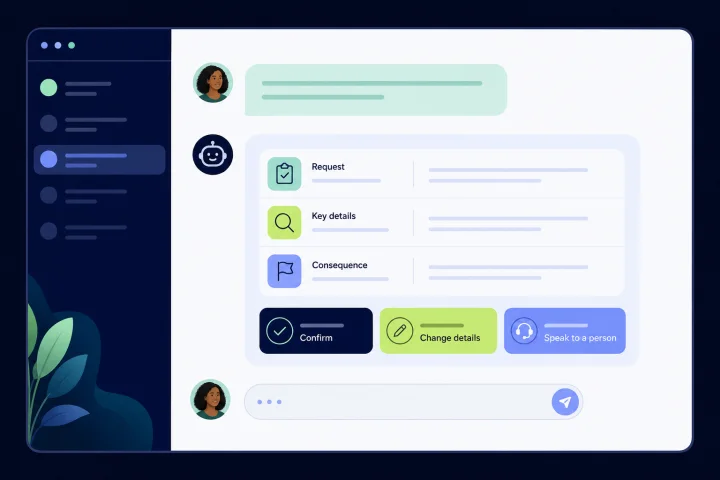
Why valid customer input is not the same as confirmed customer intent
Input validation checks whether a response meets defined rules: an expected format, permitted value, required field, or logical limit. It is an important control, but it does not establish that the customer intended the resulting action.
A customer can provide a syntactically valid date, address, account reference, quantity, or cancellation instruction and still misunderstand what will happen next. They may have selected the wrong option, assumed a request was only an enquiry, or failed to notice that the system interpreted their words in a particular way.
Treat confirmation as a separate decision point. Before a consequential request is finalized, show the customer the action the service is about to take and the details that materially affect it. Then give them a clear way to approve or correct it.
Customer confirmation establishes intent, not identity, authority, or transaction authorization. For account, financial, deletion, and other high-impact requests, a chat confirmation must not substitute for the independent authentication, authorization controls, and channel-appropriate security checks required by an approved process.
This distinction aligns with OWASP input-validation guidance and WCAG 2.2 error-prevention guidance. Validation enforces expected input; for legal, financial, and significant data actions, WCAG calls for reversibility, correction, or an opportunity to review, confirm, and correct before finalization.
- Validation question: “Does this answer meet the rule?”
- Intent question: “Is this the action and set of details the customer wants?”
- Identity and authority question: “Has the customer completed the required authentication, authorization, and security checks?”
- Processing question: “Has the action actually been completed?”
- Design rule: do not use a technically valid answer or a chat approval as a reason to skip an appropriate confirmation, authentication, authorization, or security step.

Identify the requests that need confirmation
Do not add the same confirmation burden to every support interaction. A confirmation step is most valuable when a misunderstanding could cause material harm, be difficult to undo, expose sensitive information, or create a chain of follow-on work.
Use the real risk of the action to decide which details must be repeated back. OWASP’s transaction-authorization guidance describes a related principle: people should be able to identify and acknowledge the data significant to the specific transaction, rather than approving an unspecified action.
A routine request for general opening hours may need no confirmation. A request to change a delivery address, close an account, alter a payment-related instruction, delete data, or submit a multi-step service request usually needs a more explicit control. Where required, confirmation must be paired with independent authentication, authorization, and channel-appropriate security checks rather than replacing them.
- Require a strong confirmation for irreversible or hard-to-reverse actions, including deletion, closure, cancellation, or commitment.
- Require a strong confirmation for costly actions, including charges, refunds, orders, changes to quantities, or service commitments.
- Require a strong confirmation for security-sensitive actions, especially where identity, destination, contact details, or authority may be in doubt.
- For account, financial, deletion, and other high-impact actions, use the approved process for required identity verification, authorization controls, and security checks; do not rely on an in-chat reply alone.
- Require a structured review for multi-step requests where a correct individual answer can still produce the wrong overall outcome.
- Increase review or human involvement when the customer’s language is ambiguous, details conflict, or the system has transformed or inferred a value.
- Keep low-risk interactions short, but still state clearly when a request has merely been received rather than completed.

Choose the confirmation pattern that matches the risk
The right pattern depends on how much detail the customer needs to inspect and how difficult the action would be to undo. The confirmation should make the proposed outcome visible, not merely ask the customer to reply “yes.”
For a simple, bounded request, use a repeat-back. For a request with several consequential fields, use a structured summary. For mutually exclusive outcomes, ask for an explicit choice. When the request is unclear, sensitive, or outside the automation’s reliable scope, use human review instead of forcing an automated approval.
A repeat-back or explicit chat approval can establish intent, but it does not establish identity, authority, or transaction authorization. Do not use it as the sole approval mechanism where an approved process requires independent authentication, authorization controls, or channel-appropriate security checks.
For example, WCAG describes an order review in which the customer can inspect items, quantities, shipping address, and payment method before confirming or making changes. The operational lesson applies beyond orders: expose the details that determine the outcome.
- Repeat-back: “You want us to update your contact number to 07700 900123. Is that correct?” Use for one clear detail where the process permits a chat confirmation.
- Structured summary: list the requested action and the key fields. Use for changes with multiple dependencies.
- Explicit choice: “Please choose one: keep the current appointment, move it to Tuesday, or ask an adviser to contact you.” Use when free text could be interpreted in several ways.
- Human review: “I do not want to guess which account you mean. A trained team member will review this with you.” Use for ambiguity, elevated impact, or an exception.
- Required security process: for high-impact actions, direct the customer through the approved authentication, authorization, and channel-appropriate security checks before acting.
Write confirmation messages in plain language
A useful confirmation message answers four questions: what will happen, which details will be used, what consequence follows, and how the customer can change something. Put the proposed action first. Avoid internal status labels, vague wording such as “your request is being handled,” and approvals that hide significant details.
Do not silently normalize or alter a customer-provided value. WCAG notes that when a system changes a value to fit an allowed range, the customer needs an explanation of what changed. In practice, disclose the interpreted value before finalization and offer a route to correct it.
Use short labels that work in a chat interface. Customers should not have to infer that “continue” means “authorize this change.” Use verbs that name the commitment, such as “Confirm address change,” “Submit cancellation,” or “Ask a person to review.” For high-impact requests, make clear that the confirmation does not replace any required authentication, authorization, or approved secure process.
- State the action: “We will cancel your appointment.”
- Show significant details: “Appointment: 14 May at 10:00; location: Central office.”
- State the consequence or timing only when it is known: “After confirmation, this appointment will be released.”
- Provide a correction path: “Reply CHANGE to edit the date or location.”
- Use an explicit approval for actions that the approved process permits in chat: “Reply CONFIRM to submit this cancellation.”
- For account, financial, deletion, and other high-impact actions, direct the customer to the required independent authentication, authorization, and channel-appropriate security checks.
- Avoid sensitive details in a message unless they are necessary for the customer to identify the transaction and appropriate for the channel.
Avoid false certainty before processing is complete
A pre-processing approval and a post-processing confirmation are different messages. Mixing them creates avoidable misunderstandings. “Please confirm this request” means the action has not yet been finalized. “Your request has been completed” should only be sent after the relevant process has actually completed.
For requests that require independent authentication, authorization, or channel-appropriate security checks, state that clearly. Do not imply that a chat confirmation alone is sufficient to authorize the action.
When an action is genuinely complete, give the customer a useful record. GOV.UK’s confirmation-page guidance recommends explaining what happens next and when, providing contact details, offering a way to save a record, and including a reference number when one exists.
If the service has only received the request, say so plainly. If it needs review, say that too. Do not imply that a refund has been issued, a record has been changed, or an appointment has been cancelled merely because the customer has submitted information.
- Before approval: “Review the details below. Nothing has been changed yet.”
- Before a required security step: “We have recorded your request. You must complete the approved verification and authorization process before we can act on it.”
- After approval but before completion: “We received your request and will review it. We will contact you if more information is needed.”
- After completion: “Your delivery address has been updated.” Include next steps and a reference where available.
- Failure mode: treating a customer’s “yes” as proof that an operational back-end action succeeded.
- Failure mode: treating a customer’s chat approval as a substitute for required identity verification or transaction authorization.
- Failure mode: calling an acknowledgement a confirmation, causing customers to believe a request is complete when it is awaiting review.
Design correction routes that do not make customers restart
A confirmation is only protective if the customer can fix an error without unnecessary friction. Provide a direct correction route beside the summary, and preserve the details already collected where it is appropriate to do so. Asking a customer to begin again after spotting one wrong field can encourage abandonment or an incorrect approval.
When the system detects an error, identify the problem in text and describe it. When a safe, known correction is available, suggest it. This follows WCAG input-assistance guidance and supports customers who may not easily detect a mistake from formatting, placement, or color alone.
Build correction paths around the fields that matter most to the outcome. For example, let the customer change an address without re-entering the whole request, or choose “change quantity” rather than navigating back through several generic prompts.
- Include a visible “Change details” or equivalent reply option in every high-risk confirmation.
- Name the field that needs attention: “The requested date is outside the available range.”
- Explain the accepted correction: “Choose a date between 3 and 17 June.”
- Tell the customer when an interpretation changed: “We understood ‘next Friday’ as 14 June. Change it if you meant another date.”
- Do not rely on color, iconography, or a vague error state to convey the correction needed.
- Escalate instead of repeatedly re-prompting when the customer cannot resolve the issue or the details remain contradictory.
Use automation for collection and summaries, then escalate when judgment is needed
Automation can collect validated responses, send a structured summary, branch based on a customer’s choice, transfer a conversation, and hand it to a person. Use these capabilities to make routine low-risk interactions consistent, not to conceal uncertainty or simulate a decision the flow cannot safely make.
Do not treat automated collection, a structured summary, or a chat confirmation as a substitute for required identity verification, authorization controls, or channel-appropriate security checks. For account, financial, deletion, and other high-impact requests, route the customer through the approved process and escalate when the flow cannot safely proceed.
Set a clear escalation policy before launch. The policy should define the trigger, destination, responsible team, required context, service-level expectation, and what the customer is told. A handoff should carry the request summary, relevant conversation context, and the reason for escalation so the customer does not have to repeat themselves unnecessarily.
NIST guidance supports documented responsibilities, human oversight processes, evaluation before deployment, and ongoing evaluation in operation. Where a system cannot detect or correct an error, human intervention may be necessary. This is especially important when an automated flow encounters ambiguity, conflict, or a high-impact decision.
- Escalate immediately when the customer disputes the summary or gives conflicting answers.
- Escalate when identity, authority, or security-sensitive information is uncertain.
- Escalate when the action is irreversible, legally consequential, financially material, or outside the flow’s defined rules.
- Use the approved process for required independent authentication, authorization, and channel-appropriate security checks before acting on high-impact requests.
- Escalate after a defined failed-attempt threshold rather than looping the same question indefinitely.
- Tell the customer what happens next: “A specialist will review this request. Please do not send sensitive information unless they ask through an approved process.”
- Route handoffs to an appropriately trained department or operator, with ownership for the next response.
Operational checklist for confirmation flows
Confirmation quality is an operating discipline, not only a copywriting task. Test the message and the handoff as a complete service journey: normal requests, typos, changed minds, contradictory answers, unsupported requests, accessibility needs, and downstream processing failures.
webchat.vip can support this work through its shared WebChat and WhatsApp inbox, operator and department organization, routing, schedules, service levels, templates, tags, automated flows, conversation logs, ratings, analytics, and exportable reports. Configure the operational design around your own policies and trained teams; platform features do not remove the need for human judgment.
For WebChat, use the installable, customizable, multilingual widget to present understandable confirmation and correction choices. For automated flows, use validated collection and branching carefully, then transfer or hand off when the escalation policy requires it. For account, financial, deletion, and other high-impact actions, ensure the flow directs customers to the approved authentication, authorization, and channel-appropriate security process rather than relying on an in-chat confirmation. Review conversation records and operational reports to find where customers abandon, correct details, dispute summaries, or need human help.
- Define the action categories that require no confirmation, concise confirmation, structured confirmation, or human review.
- For every high-risk flow, document the action, significant details, approval wording, correction path, required authentication and authorization controls, completion message, and escalation owner.
- Test happy paths and exceptions, including an incorrect but valid value, a changed mind, unclear free text, duplicate requests, an unavailable downstream process, and a customer who has not completed the required security process.
- Check accessibility: plain language, text descriptions of errors, clear options, and no reliance on color or implied status alone.
- Separate “received,” “awaiting review,” and “completed” states in templates and operator guidance.
- Set ownership for content, operational policy, exception handling, quality review, and updates after process changes.
- Review logs, ratings, analytics, and exportable reports for correction rates, repeated prompts, handoff reasons, unresolved requests, and customer confusion.
- Give operators a clear authority boundary: when they can correct a request, when they must seek specialist review, and how to record the outcome.
Frequently asked questions
What is the difference between validation and confirmation in customer support?
Validation checks whether input matches defined rules, such as an allowed format or value. Confirmation checks whether the customer understands and approves the resulting action and its significant details. A response can pass validation while still representing the wrong intent. Confirmation does not establish identity, authority, or transaction authorization.
Which support requests should require explicit confirmation?
Prioritize irreversible, costly, security-sensitive, legally consequential, and multi-step actions. Examples include deletion, cancellation, changes to important contact or destination details, and requests involving financial or account-related consequences. Where required, pair confirmation with independent authentication, authorization controls, and channel-appropriate security checks.
What should a customer support confirmation message include?
State the proposed action, repeat the details that materially determine the outcome, explain the consequence or next state when known, ask for explicit approval, and provide a simple way to change a detail or reach a person. For high-impact requests, explain any required approved authentication, authorization, or secure process.
When should an automated confirmation flow escalate to a person?
Escalate when answers are ambiguous or contradictory, the customer disputes the summary, identity or authority is uncertain, the action is high impact, the request is outside defined rules, or the flow cannot safely detect and correct the problem.
How can webchat.vip support confirmation-flow operations?
webchat.vip provides a shared inbox for WebChat and WhatsApp conversations, routing and department organization, templates and tags, automated flows that can collect validated responses and hand off to people, plus conversation logs, ratings, analytics, and exportable reports for review.
Sources and further reading
Primary and authoritative references used to verify the factual foundation of this guide.
- WCAG 2.2: Error Prevention (Legal, Financial, Data) — W3C Web Accessibility Initiative
- WCAG 2.2: Error Identification — W3C Web Accessibility Initiative
- WCAG 2.2: Error Suggestion — W3C Web Accessibility Initiative
- Application Security Verification Standard: Input Validation (V2.2.1) — OWASP Foundation
- Transaction Authorization Cheat Sheet — OWASP Foundation
- Confirmation pages — GOV.UK Design System
- AI RMF Core — National Institute of Standards and Technology
- AI Risks and Trustworthiness — National Institute of Standards and Technology