How to Validate Customer Responses in Chat Without Creating Dead Ends
Design chat validation as a service-access safeguard: ask only for necessary information, explain errors clearly, preserve progress, limit retries, and make human help easy to reach.
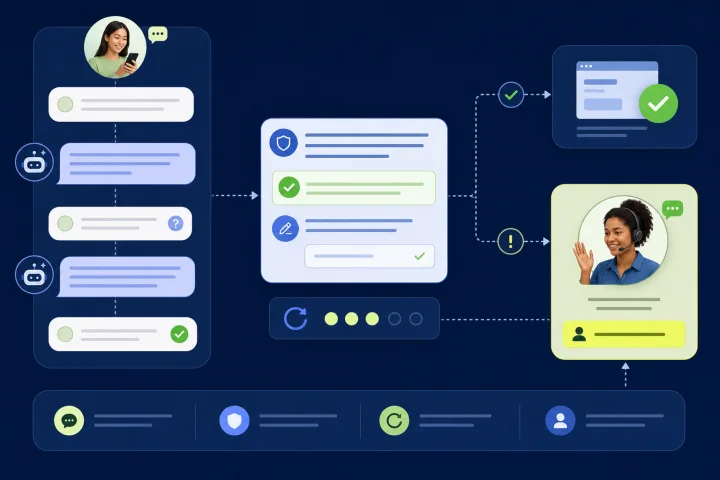
Why strict chat validation creates avoidable effort
To validate customer responses in chat effectively, treat validation as part of service design rather than a narrow field-format rule. A rejected answer can mean several different things: the customer misunderstood the question, the reply is formatted differently, the requested information is unavailable, or the automated path is not suitable for the case.
A strict rule can protect a downstream process, but it becomes a dead end when it offers no useful explanation, discards earlier work, or repeats the same question indefinitely. The operational goal is not to reject more answers. It is to collect the minimum reliable information needed to move the customer to the right outcome or to a person who can decide the exception.
A sound design separates the customer-facing recovery experience from the control itself. Use clear, prompt feedback in the conversation, while applying required validation again before downstream application processing. Client-side checks can improve usability, but they can be bypassed; server-side validation remains necessary.
- Avoid vague replies such as “Invalid input” or “Try again.”
- Do not silently reset a step or make a customer infer what failed.
- Keep one failed answer from restarting an otherwise valid process.
- Make leaving the automation path a supported outcome, not a failure state.

Map what needs validation before writing the flow
Different checks require different messages and recovery paths. Start by classifying every answer the flow collects. OWASP distinguishes syntactic validation, which checks the structure of a value, from semantic validation, which checks whether it is valid in the relevant business context. A date can have the expected format and still be unavailable, outside a permitted window, or incompatible with another answer.
Safety-related validation needs particular care. Do not turn a high-risk or urgent situation into a formatting exercise. If a reply indicates that automation cannot safely assess the situation, stop asking the customer to refine keywords and route them to an appropriate human-reviewed process or clearly stated alternative contact route.
- Format: reference number length, allowed response option, date structure, or a complete email address.
- Completeness: required elements are missing, such as an order number without the related email address when both are genuinely necessary.
- Eligibility or business context: the value is well formed but does not meet a policy, availability, date-range, or combination rule.
- Safety or sensitive exceptions: the answer needs human judgment, a specialist procedure, or a secure channel.
- Ownership: define who maintains each rule, who may override it, and what evidence is needed for an override.

Ask for less, and make optionality explicit
The easiest validation failure to resolve is the one you never create. Review each question against the actual decision the flow must make. NIST defines minimization as limiting personal information collection, use, processing, storage, and disclosure to what is directly relevant and necessary for an authorized purpose.
Where the process only needs a result, ask for that result rather than a full sensitive value where feasible. For example, an eligibility decision may require confirmation that someone meets an age threshold rather than their full date of birth. Mark optional questions as optional, explain why a required answer is needed where this helps comprehension, and do not gather information merely because it might be useful later.
- For every field, document the decision it enables.
- Remove duplicate questions that another system or earlier step already answered.
- Offer “I don’t have this” only when there is a defined route for that answer.
- Do not label a field required if a human agent can reasonably resolve the case without it.
- Review whether a sensitive answer belongs in this chat flow or a more appropriate secure process.
Write feedback that helps customers correct the answer
When the flow automatically detects an error, identify the item that needs attention and describe the problem in text. WCAG guidance supports feedback that tells people what went wrong rather than relying on color, styling, or a redisplayed question alone. When a safe, known correction exists, include it.
A useful validation message has four parts: the question or field at issue, the reason the reply cannot be used, one accepted example or constrained choice, and the immediate next action. Keep the tone neutral. The customer did not “fail”; the system could not use the reply in its current form.
- Weak: “Invalid date.”
- Better: “I need the delivery date in day/month/year format, for example 08/04/2026. Please send the date again.”
- Weak: “Reference not found.”
- Better: “I could not match that reference. Check the confirmation message and send the full reference, for example AB-123456. If you cannot find it, choose ‘I need help finding it.’”
- For an ineligible but well-formed answer: explain the relevant limitation without exposing sensitive rules or security controls, then offer the applicable next route.
Use progressive recovery instead of repeated rejection
One clarification may solve a typo or misunderstanding. Repeating the same open-ended prompt usually does not. Build a staged recovery pattern so the flow becomes more guided as uncertainty rises: clarify once, offer constrained choices or an alternate input method, then provide an exit to help.
Three unsuccessful attempts is a practical escalation trigger to consider. W3C cognitive-accessibility guidance specifically suggests providing human contact details when a chatbot cannot give a satisfactory response after three attempts. This is advisory guidance rather than a universal rule, so teams should adjust the threshold for the risk and complexity of the task. A high-impact request may warrant an earlier handoff; a simple non-sensitive choice may justify a different threshold.
- Attempt 1: explain the issue and show an accepted example.
- Attempt 2: offer buttons, a short list of expected values, or a different way to provide the information.
- Attempt 3 or earlier when risk warrants: offer free-text help, another contact method, or human handoff.
- At every stage: retain valid answers and show a visible way out of the automated step.
- Do not conceal the help route behind a deliberately invalid response or an obscure command.
Preserve progress and accept real-world input
A customer should not have to restart because one answer failed. Keep previously validated answers available through the same process unless re-entry is essential for security or the information is no longer valid. This aligns with WCAG guidance on redundant entry and reduces both customer effort and agent handle time after transfer.
Design accepted inputs for actual customer behavior. People use spelling variants, paste values with spaces, switch keyboard layouts, type on small screens, and reply in languages or scripts other than the interface language. For structured values, define a clear allowlist of acceptable forms and normalize safe presentation differences before comparison where appropriate. Allowlisting is generally more robust than trying to block a growing list of “bad” patterns.
For free text, avoid narrow Latin-only assumptions. Unicode-aware handling and canonical normalization help systems treat equivalent text representations consistently. Do not reject legitimate names simply because they contain apostrophes, accents, non-Latin scripts, or ordinary punctuation. At the same time, normalization is not permission to accept any value for a structured business field; apply the documented rule for that field.
- Keep confirmed values in the flow state and pass them with a transfer where appropriate.
- Trim unintended surrounding spaces only when doing so does not change meaning.
- State the accepted date format, or offer a date selector where the channel experience supports it.
- Accept documented variants of a reference number if they resolve to the same intended identifier.
- Test multilingual and mobile-typed replies, not only ideal desktop examples.
- Do not convert or “correct” a customer’s name without confirmation.
Make human escalation explicit and useful
Human escalation is essential when the flow cannot interpret the answer, the customer disputes the result, the case falls outside a documented rule, or the consequence of an incorrect automated decision is material. Offer the route in a consistent, easy-to-find location across related flows. WCAG describes human contact, automated contact, self-help, and contact details as possible help mechanisms; a team should choose and operate the combination appropriate to its service.
The handoff must carry context. Send a short internal summary with the current step, the validation category, the answers that passed, the answer that could not be interpreted, the number of attempts, and any customer-selected reason for help. Avoid copying more personal data than the receiving team needs. The agent should begin by acknowledging what is already known, not by asking the customer to repeat the entire interaction.
Set an operational owner for exception queues, routing rules, coverage schedules, and service-level expectations. If live help is unavailable, say so plainly and provide the next available route rather than implying an immediate response.
- Escalate immediately for safety concerns, suspected account compromise, consent withdrawal, accessibility barriers, or decisions requiring discretion.
- Escalate after the configured retry limit for unresolved format or eligibility problems.
- Provide a free-text “Describe the problem” option when structured answers do not fit the case.
- Use a transfer summary such as: “Step: order lookup; issue: reference format unresolved; attempts: 2; confirmed: contact preference; customer asks for help.”
- Give agents authority boundaries: resolve, request verification, route to a specialist, or record a rule-improvement candidate.
Test, monitor, and improve validation rules
Validation quality is an operational metric, not a one-time build task. Test the intended path and the recovery paths with representative examples: correct replies, near misses, missing data, conflicting combinations, multilingual responses, pasted values, mobile typos, and customers who join the flow with little context. Test the chat interface with assistive technology and confirm that error and status messages can be presented when the interface updates without moving focus.
Review conversation logs and reports for repeat invalid entries, abandonments at a validation step, manual overrides, transfers, and recurring free-text explanations. A high rejection rate may indicate a poorly worded question, an overly narrow rule, an upstream data issue, or a customer need the flow does not cover. It is not automatically evidence of customer error.
Log enough information to investigate validation failures and potential bypass attempts, while applying data minimization to the log itself. Separate operational analysis from any decision to broaden an accepted-input rule; rule changes should be reviewed by the process owner, security owner where relevant, and the team responsible for the downstream outcome.
- Measure invalid replies per step and per language or entry point where relevant.
- Compare first-attempt completion with completion after recovery and after transfer.
- Sample transcripts where an agent overrode or corrected automation.
- Check whether retry limits trigger too late, too early, or disproportionately for a customer group.
- Review rejected-but-legitimate examples and update the allowlist, examples, or routing logic.
- Verify that status and error messages are perceivable as text and available to assistive technologies.
Frequently asked questions
What is the best retry limit for chat validation?
There is no single universal limit. Start with one clear clarification, one more guided option, and then a visible help route. Three unsuccessful attempts is a useful benchmark from W3C cognitive-accessibility advice, but use earlier escalation for sensitive, high-impact, or safety-related cases.
Should chat flows accept free-text responses?
Yes, when customers may reasonably need to explain an exception or ask for help. Use structured choices for predictable decisions, but preserve a free-text route and human escalation for cases that do not fit the predefined options. Handle free text as Unicode-aware input rather than assuming Latin-only characters.
How should teams handle a valid format that fails an eligibility rule?
Explain that the value was received but cannot be used for the current request, state the next permitted option when it is safe to do so, and provide an exception or human-help route. Do not describe this as a formatting mistake.
How can webchat.vip support this approach?
webchat.vip automated flows can collect validated responses, branch conversations, transfer cases, and hand off to people. Its shared inbox supports WebChat and WhatsApp conversations, while operators, departments, routing, schedules, service levels, templates, and tags can support an owned escalation process. Conversation logs, operational analytics, ratings, and exportable reports can support ongoing review of failure and transfer patterns.
What should an agent receive when validation fails?
Provide the current flow step, failure category, attempt count, answers already confirmed, the unresolved reply where appropriate, and the customer’s stated need. This lets the agent continue the service rather than restart the interview.
Sources and further reading
Primary and authoritative references used to verify the factual foundation of this guide.
- Web Content Accessibility Guidelines (WCAG) 2.2 — W3C Web Accessibility Initiative
- Understanding Success Criterion 3.3.1: Error Identification — W3C Web Accessibility Initiative
- Understanding Success Criterion 4.1.3: Status Messages — W3C Web Accessibility Initiative
- Understanding Success Criterion 3.2.6: Consistent Help — W3C Web Accessibility Initiative
- Input Validation Cheat Sheet — OWASP
- Business Logic Security Cheat Sheet — OWASP
- Logging Vocabulary Cheat Sheet — OWASP
- NIST Computer Security Resource Center: Minimization — National Institute of Standards and Technology
- NIST SP 800-63C: Federation and Assertions — National Institute of Standards and Technology
- Unicode Standard Annex #15: Unicode Normalization Forms — Unicode Consortium