How to Design a WebChat Fallback Path When Chat Is Unavailable or Hard to Use
A WebChat fallback path is a defined support service for people who cannot, do not want to, or should not have to complete their task in chat. Learn how to make it accessible, owned, testable and privacy-aware.
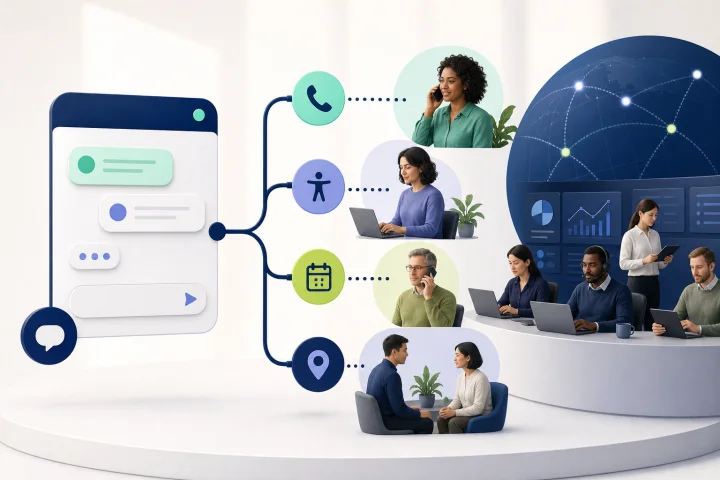
A fallback path is part of the service, not a last-resort contact link
A WebChat fallback path is the practical route a customer can take when embedded chat is unavailable, inaccessible, unsuitable for the task, or simply not their preferred way to get help. It should lead to a service that can actually progress the customer’s issue, rather than a generic page that restarts their journey.
This matters beyond disability. People may lack reliable internet access, digital confidence, skills, trust or motivation to complete a task online. A support operation should plan for these circumstances as normal service conditions, not as exceptional cases.
Place the fallback where the need occurs: beside the launcher or chat entry point, in chat error states, at high-friction steps, and within the relevant transaction. Use the same relative placement and wording wherever the help mechanism repeats, so customers can find it predictably.
- Treat the route as a supported service with a destination, owner, hours and completion process.
- Make it available before a customer has completed a chat flow or disclosed unnecessary information.
- State the available alternatives plainly, such as phone, accessible web form, callback request or a service-specific in-person route.
- Do not make chat the only way to report an issue with chat itself.

Map where chat can fail or become hard to use
Start with an end-to-end failure map. A widget can fail to load; it can load but be difficult to operate by keyboard; a customer can be blocked by authentication, file upload, validation or an automated response; or the conversation can reach a queue with no suitably available person. Each point needs a defined next step.
Separate failures your website team can design for from conditions it cannot fully control. Your team controls the visibility and accessibility of the alternative route, the wording, the form design, the data collected, the routing rules and the staffing policy. Browser support, network conditions and third-party channel availability may affect the experience, but they do not remove the need for a usable alternative.
Include customer choice in the map. A person who says they would rather call, needs an interpreter or cannot safely continue in chat is not a failed conversion. They are requesting an appropriate service route.
- Widget does not appear because scripts are blocked, the connection is slow or the browser is unsupported.
- Launcher, controls, focus movement or message entry cannot be used effectively with a keyboard or assistive technology.
- Login, identity checks or one-time-code processes prevent progress.
- File upload, input validation or submission feedback is unclear or repeatedly fails.
- Automation does not understand the request, cannot validate an answer or reaches an out-of-scope case.
- No trained human is available during the customer’s required timeframe.
- The issue requires a channel with capabilities chat cannot safely provide, such as a service-specific appointment or in-person assistance.

Set a minimum standard for every fallback route
Use four tests: visible, understandable, operable and available. A customer should be able to see the route without completing chat, understand what will happen next, operate it without a pointer or unnecessary barriers, and reach a service that is genuinely staffed or that provides a clear out-of-hours outcome.
For an accessible fallback form, request only what is needed to handle the support transaction. Give every control a visible associated label, provide instructions where needed, and do not rely on placeholder text to communicate required information. If an error occurs, identify the affected field, explain the problem and correction, and link to the field where appropriate.
Test forms on the server as well as in the browser. Client-side checks can be bypassed and browser support varies. After submission, provide an unambiguous confirmation that the request was received, or a clear error outcome and a route to continue if submission cannot be completed.
- Keyboard: all route controls, fields and submission actions work without a mouse, and visible focus remains apparent.
- Zoom and reflow: at a width equivalent to 320 CSS pixels, no information or function is lost and ordinary use does not require two-dimensional scrolling.
- Authentication: do not require a cognitive-function test unless an alternative method or assisting mechanism is available.
- Feedback: success, failure and next-step messages are clear and exposed accessibly.
- Consistency: repeated help routes appear in a consistent relative location across relevant pages.
Choose a route that fits the task and the customer
There is no universally correct alternative. Select routes through user research, service risk and operating capacity. Telephone may be best for urgent or complex issues; a callback request can reduce time on hold; an accessible form suits non-urgent cases that need a written record; and an in-person or service-specific route may be necessary where a customer needs practical assistance.
Do not publish a route merely because it exists elsewhere in the organisation. Confirm that it accepts the relevant issue type, has a receiving team, protects customer information and can communicate an outcome. A fallback that reaches an unmonitored mailbox creates a second failure.
Where chat and fallback are part of the same process, avoid asking customers to repeat information they already provided. Subject to appropriate privacy controls, information required again should be available for selection or pre-populated. Do not transfer sensitive information automatically just because it was entered in chat.
- Phone: use for urgent, sensitive or high-complexity matters; publish calling hours and accessibility arrangements where applicable.
- Accessible web form: use for structured, non-urgent requests; provide a reference or confirmation after successful submission.
- Callback request: use when customers should not need to wait in a queue; collect a suitable contact method and only the scheduling details needed.
- In-person or specialist route: use when a task requires local, practical or regulated assistance.
- Emergency or safeguarding route: make this distinct from ordinary support where relevant, with wording and ownership approved by the responsible service team.
Write copy that gives the next step without making promises you cannot keep
Fallback copy should acknowledge the situation, state the available action and explain what happens after it. Avoid blaming the customer, technical jargon and vague wording such as “try again later” with no other choice. Avoid response-time promises unless the responsible team can reliably operate to them and has approved the wording.
Use channel-specific copy. A phone option needs a number and hours. A callback request needs the expected confirmation mechanism and any restrictions. A form needs a statement of what the customer can submit and a clear success message. An out-of-hours state needs the next available action, not a dead end.
- Example widget failure message: “Chat is not available right now. You can request support using our accessible form or call [number] during [hours].”
- Example automation exit: “I have not been able to resolve this in chat. Choose ‘Request help from a person’ to send your details to the support team, or use [alternative route].”
- Example form confirmation: “Your request has been received. Keep this confirmation for your records. If your issue is urgent, call [number].”
- Avoid: “We will respond shortly” unless “shortly” has an operationally defined and monitored meaning.
Carry context forward carefully, with consent and verification boundaries
Context transfer can reduce customer effort, but it must be proportionate. Define a small handoff record for each fallback route: the issue category, a short customer-written summary, journey step, relevant case reference and preferred contact method may be enough. Identify what is never copied automatically, such as unnecessary attachments, sensitive free text or credentials.
Tell customers what will be sent to the next team and give them a chance to review or amend it where appropriate. If a different department, system or purpose is involved, privacy reviewers should determine whether new consent, a new notice or another lawful basis is required. A fallback route is not a reason to collect more data than the task needs.
Receiving staff must verify identity through the organisation’s approved process before disclosing account information or acting on sensitive requests. A case reference can help locate work; it is not automatically proof of identity.
- Define the minimum handoff fields and the retention rule for each route.
- Never ask customers to send passwords, authentication codes or other credentials through chat or a fallback form.
- Keep a customer-facing explanation of what information moves and why.
- Let staff see the original conversation only when their role and the case require it.
- Provide a manual path when context cannot be transferred safely or technically.
Build explicit exits from automation and a human escalation path
Automation should offer a route out before frustration becomes abandonment. Define triggers for an assisted path: repeated misunderstood intent, repeated validated-response failures, an explicit request for a person, a high-risk topic, an out-of-scope request or an automated flow that cannot complete a required step.
The escalation route must name a receiving queue or alternative channel, not simply display a reassuring message. Set what the automation passes forward, what customers need to do next, and what happens if no person is currently available. Where a handoff cannot be staffed, offer the approved callback, form or phone route instead.
Human judgment remains necessary for exceptions, ambiguous requests, complaints, vulnerability indicators and cases where policy or safety requires review. Staff need instructions for accepting, rerouting and closing fallback requests, including what to do when the request has arrived in the wrong department.
- Trigger: customer selects “speak to a person” or equivalent; action: offer staffed transfer or a clearly labelled alternative route.
- Trigger: two or more unsuccessful attempts at the same validated answer; action: explain the blockage and offer assistance without forcing another attempt.
- Trigger: sensitive, urgent or policy-defined issue; action: suppress unsuitable automation and direct to the responsible service route.
- Trigger: out of hours; action: show current availability and the next supported action, with no implication that live help is present.
Assign ownership across queues, schedules and departments
Every fallback request needs an accountable owner from receipt through resolution. Map the operating model by request type, channel, internal team, coverage hours, escalation contact and closure standard. Distinguish the team that owns the website presentation from the team that owns the service outcome; they may not be the same.
A shared inbox can be useful when WebChat and WhatsApp conversations need coordinated handling, but not every fallback must enter the same workspace. Telephone, in-person and specialist routes may have separate systems and controls. What matters is a documented handoff and a way to identify requests that have not received a responsible response.
Plan for demand changes, trained coverage, privacy protection and feedback loops. If a route is unavailable outside operating hours, set and test the out-of-hours wording and ownership for requests received then.
- Name a service owner, a day-to-day queue owner and an escalation owner for each route.
- Document opening hours, language coverage, specialist coverage and out-of-hours handling.
- Define routing rules for wrong-team, duplicate, incomplete and urgent requests.
- Give staff templates, verification instructions and a clear route for accessibility or privacy concerns.
- Review unresolved requests and repeat failure patterns with the teams able to fix them.
Frequently asked questions
What is a WebChat fallback path?
It is a defined alternative support route for customers who cannot, do not want to, or should not have to complete their task in embedded chat. It includes the customer-facing route, the receiving team, operating hours, privacy controls and resolution process.
Is a generic contact page enough when WebChat is unavailable?
Usually not. A generic contact page may not identify the relevant issue, provide an accessible method, preserve necessary context or reach a team that can act. A useful fallback tells customers exactly what to do and connects them to an owned service path.
What should a fallback form collect?
Collect only the information needed to handle the request, such as issue category, a concise description, a safe contact method and a relevant reference. Use visible labels, clear instructions, accessible error messages and server-side validation. Do not request passwords or authentication codes.
How should automation escalate to a person?
Set explicit triggers, including a direct request for human help, repeated validation failures, repeated misunderstanding, high-risk topics and out-of-scope requests. The trigger should lead to a staffed queue when available or to a clearly labelled phone, callback or form route when it is not.
How can webchat.vip support the primary WebChat service?
webchat.vip provides installable, customizable and multilingual WebChat widgets, plus automated flows that can collect validated responses, branch, transfer and hand off to people. Teams can organize operators, departments, routing and schedules, and use a shared inbox for WebChat and WhatsApp conversations. Operational analytics, conversation logs, ratings and exportable reports can support review. Website owners remain responsible for designing and operating alternative support routes outside the primary chat service.
Sources and further reading
Primary and authoritative references used to verify the factual foundation of this guide.
- Web Content Accessibility Guidelines (WCAG) 2.2 — W3C
- Understanding Success Criterion 2.1.1: Keyboard — W3C Web Accessibility Initiative
- Forms Tutorial — W3C Web Accessibility Initiative
- Validating Input — W3C Web Accessibility Initiative
- User Notification — W3C Web Accessibility Initiative
- Understanding Success Criterion 3.3.8: Accessible Authentication (Minimum) — W3C Web Accessibility Initiative
- Assisted digital support: an introduction — GOV.UK Service Manual
- Designing assisted digital support — GOV.UK Service Manual
- Set up and manage user support — GOV.UK Service Manual
- Quality assurance: testing your service regularly — GOV.UK Service Manual