How to Design Multilingual WebChat Language Selection Without Routing Customers Incorrectly
A multilingual WebChat should let people choose both a readable interface and the language in which they want support. Learn how to collect that preference clearly, route only to staffed teams, and offer a transparent human fallback when a matching queue is unavailable.
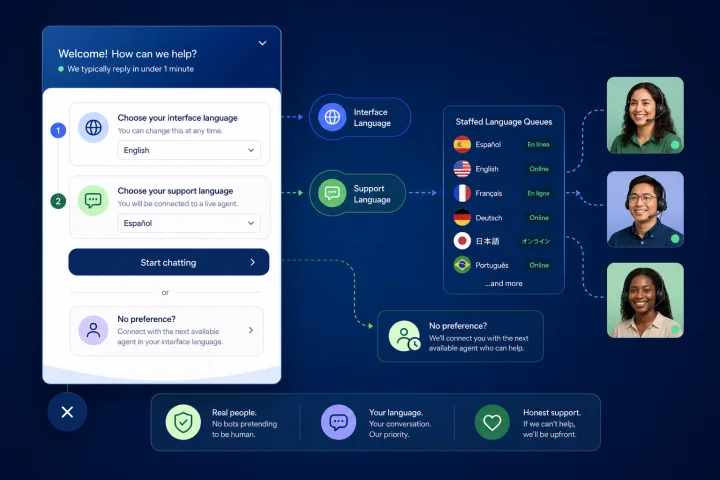
Treat widget language and support language as separate decisions
Multilingual WebChat language selection involves two different operational choices. The first is the widget display language: the language used for buttons, prompts, privacy text, error messages, and other interface elements. The second is the customer’s preferred support language: the language in which they want to explain an issue and receive help from a person.
These choices may align, but they should not be assumed to align. A customer may prefer an English interface while requesting support in Arabic, use a shared browser configured in another language, or choose a familiar interface language for a technical task while wanting to speak to an agent in their strongest language.
Design and store these as distinct fields. “Widget language” controls presentation. “Preferred support language” is a stated service preference that may be used for routing when coverage rules permit it. Keeping the fields separate prevents a readable interface from becoming an unsupported promise of human-language coverage.
- Do not label a UI setting simply “Language” if it can affect routing; distinguish “Chat display language” and “Preferred support language.”
- Show the supported service languages before the customer starts a language-specific route.
- Allow a customer to change either choice during the conversation.
- Do not equate a translated widget with guaranteed support by a fluent human operator.

Do not guess a customer’s preferred support language
Browser language settings can be useful as a presentation hint, but they are not a definitive statement of a person’s reading or support preference. Browsers may send an ordered list of Accept-Language preferences, and people can use shared devices, inherited settings, or a browser configuration that does not fit the content they want to read.
Location is also an unreliable proxy. A person’s IP-based location does not necessarily match the language they prefer to read or use in support. Names, account fields, and previous messages are similarly unsafe shortcuts: they can be incomplete, outdated, ambiguous, or sensitive.
Use any technical signal only to suggest a reversible display-language default. Always provide a visible choice, and do not use inferred language alone to place someone into a language-specific queue. Routing should follow an explicit choice and verified operating coverage.
- Safe use: preselect a widget display language while leaving the choice visible and easy to change.
- Unsafe use: route by country, IP address, name, or browser header without confirmation.
- Avoid asking agents to infer language capability from identity-related fields.
- If the customer writes in a different language, let an agent or flow offer a preference update rather than silently changing the route.

Publish a supported-language policy before building routes
A language menu is a service commitment. Define what each listed language means in practice before exposing it in the widget. The policy should cover departments, operating hours, service levels, handoff ownership, and what happens when qualified operators are unavailable.
A useful model has three categories. Fully supported languages have trained or designated coverage for the relevant department and schedule. Limited-support languages may be available only for particular topics, departments, or hours. Fallback languages are languages in which the team can offer a clearly described alternative, such as a general queue, a contact option, or a request for later follow-up according to your own operating policy.
Keep the public menu aligned with this policy. If a language is available only during certain hours, say so before the customer commits to that route. If the business cannot provide support in a requested language, do not represent automated text, a generic queue, or a translated widget as equivalent to language-qualified human assistance.
- For every language, name the owner responsible for coverage decisions.
- Define coverage by department, not only across the business as a whole.
- Document schedules, operator capability requirements, overflow rules, and the fallback message.
- Review the language list whenever staffing, departments, or schedules change.
Make language selection clear, accessible, and low effort
Use plain language and native language names and scripts in the selector, such as “Español,” “Français,” and “العربية.” Native naming helps customers recognize their choice without needing to understand the current interface language. If useful, add a current-interface-language explanation, but do not replace the native name.
Every control needs a label that identifies its purpose and is associated with the control for assistive technologies. Ensure the entire selector works with a keyboard, including opening the control, moving through choices, selecting an option, closing it, and reaching the next step. Preserve a visible focus indicator and avoid a menu that traps focus.
Set the programmatically determinable language of the widget content correctly, and identify meaningful language changes within content where applicable. Test the selector at narrow mobile widths and with long language names so that options do not become clipped, obscured, or hard to activate.
- Use a labeled control such as “Choose your support language.”
- Present native names; avoid flags as the sole language indicator.
- Keep a default or fallback option when the requested language is not available.
- Provide “Continue in the current language” or an equivalent non-blocking option.
- Do not require a language selection to reach urgent human help unless that requirement is genuinely necessary for the service.
Collect only the preference needed to deliver service
Explain why you ask. A concise message such as “We use your choice to try to connect you with the right support team for this conversation” gives customers a service-delivery reason without overstating what the system can do. Purpose clarity helps teams decide what information is necessary and supports data minimisation.
Usually, the needed input is a preferred support language selected from a controlled list, plus an “Other / I need help choosing” option if appropriate. Avoid asking for nationality, ethnicity, birthplace, or other identity information to make a routing decision. Those details are not required to establish a conversational preference.
Within the same process, do not make customers repeat a language they have already supplied. Show the recorded choice for confirmation or allow selection from it when it is needed again. This reduces friction without requiring that the preference be retained between separate sessions.
- State the purpose at the point of collection.
- Collect a language preference, not identity data.
- Make “I am not sure” and “Other” routes actionable rather than dead ends.
- Give customers a way to correct a mistaken selection.
- Set retention, access, and review practices according to your organization’s applicable privacy obligations and policies.
Route only when the coverage rule is true
A language-routing rule needs more than a language label. It needs an eligible department, a schedule, an operator capability requirement, and a current availability condition. In contact-center terms, the requested language is a task property; qualified operators are eligible based on skills or capability; and availability determines whether an eligible operator can receive a new conversation.
In webchat.vip, teams can organize operators, departments, routing, schedules, and service levels in a shared inbox for WebChat and WhatsApp conversations. Use those operating controls to implement only the routing rules your team can maintain. For example, “Spanish billing support during published hours” is safer than a broad rule that sends every Spanish preference to a department with no available qualified operator.
Do not create a queue merely because a language has appeared in a menu. Test the full chain: stated preference, matching department, eligible operator coverage, schedule state, availability, overflow condition, and customer-facing message.
- Route on explicit preference plus an active coverage condition.
- Match language coverage to the requested department or topic.
- Do not assign conversations to operators who have not been approved for that language-service role.
- Define a maximum wait or overflow trigger based on your own service policy.
- Keep the fallback owner accountable; an overflow is not complete until a person or viable next step owns it.
Build an honest fallback instead of a silent misroute
The critical failure mode is a customer choosing a language and being silently placed into an unsuitable queue. This creates repeat explanations, avoidable transfers, longer waits, and a loss of trust. A fallback must tell the customer what is available now, what is not available, and how to reach human help or continue the request.
A good fallback can offer a general-language human queue, a request to wait until the next published coverage period, or another human contact route that your organization actually operates. The wording should distinguish a language-specific queue from general support. Never say an agent will speak the requested language unless the assignment rule confirms that condition.
When automation has not provided a satisfactory response after repeated attempts, make human contact details or a human handoff available. A practical threshold is three unsuccessful attempts, paired with a visible “Talk to a person” option. If people are unavailable, state when human support is expected to be available rather than leaving customers in an indefinite automated loop.
- Tell the customer immediately when their chosen language is unavailable for the selected department or time.
- Offer a real next action: general human queue, published return time, or another staffed contact route.
- Keep a “Talk to a person” path visible and allow the chat to be dismissed and recalled.
- Log the fallback reason: no coverage, out of hours, no available qualified operator, or customer-requested change.
- Escalate urgent, vulnerable, complaint, safety, or repeated-failure cases to the designated human owner under your internal procedures.
Use automation to assist choice and handoff, not to trap customers
Automated flows in webchat.vip can send messages and files, collect validated responses, branch, transfer, and hand off conversations to people. Use this capability to present language choices, confirm the selected preference, check the appropriate routing condition, and deliver the corresponding queue or fallback message.
Validation should prevent unusable values, not force a customer into an artificial answer. A controlled selector is usually better than free text for routing, but it should include an escape route for customers whose language is absent or who cannot decide. If free-text input is used, do not treat it as a reliable routing code without a review rule.
Design for interruption. Customers may arrive with a different issue, change their selected language, or ask for a person immediately. At every branch, retain access to a human path and avoid circular prompts such as repeatedly asking the same language question after the customer has answered.
- Confirm the chosen support language in a short, understandable message.
- Pass the choice as conversation context to the receiving team.
- Provide a visible human escalation action at each automated stage.
- After repeated unsuccessful automation attempts, stop retrying the same path and offer human help.
- Test invalid, blank, changed, and unavailable-language responses.
Frequently asked questions
Should WebChat automatically route customers based on browser language?
No. Browser language can be a reversible hint for the widget display language, but it is not a reliable statement of the customer’s preferred support language. Let the customer choose, then route only if staffing and schedule rules support that choice.
Can we use country or IP location to select a support language?
Do not use location as the deciding signal. Location does not necessarily match a person’s preferred reading or support language. Offer an explicit language choice and retain a clear fallback.
What should happen when no agent is available in the requested language?
Tell the customer promptly. Offer the next staffed option your organization can actually provide, such as a general human-support queue, a published future availability time, or another staffed contact route. Do not silently transfer the conversation to an unsuitable queue.
How should language preferences be stored in a conversation?
Keep the stated preferred support language as useful conversation context, separate from widget display language. Let customers change it, pass it to the receiving team, and apply documented review rules when the written conversation or the customer’s explicit request indicates an exception.
What should we measure after launch?
Use conversation logs, operational analytics, ratings, and exportable reports to review stated-language routing accuracy, transfers after language selection, repeat explanations, wait outcomes, fallback reasons, abandonment, and human-escalation use. Do not treat language preference as a proxy for identity or customer value.
What is the launch checklist for multilingual WebChat language selection?
Confirm the supported-language policy; separate display and support-language settings; verify labels, keyboard operation, screen-reader behavior, mobile layout, and language metadata; test schedules and eligible operator coverage by department; test out-of-hours and no-operator fallback; verify human escalation after repeated automation failure; test preference changes and mixed-language conversations; review customer wording for unsupported promises; and assign owners for routing, staffing, privacy, accessibility, and ongoing reporting.
Sources and further reading
Primary and authoritative references used to verify the factual foundation of this guide.
- Guiding users to translated pages — W3C Internationalization
- When to use language negotiation — W3C Internationalization
- Internationalization Quick Tips for the Web — W3C Internationalization
- Web Content Accessibility Guidelines (WCAG) 2.2 — W3C
- Labeling Controls — W3C Web Accessibility Initiative
- Understanding Success Criterion 3.2.6: Consistent Help — W3C Web Accessibility Initiative
- Understanding Success Criterion 3.3.7: Redundant Entry — W3C Web Accessibility Initiative
- Core concepts: Routing — Twilio Documentation
- Configure Skill-Based Routing — Twilio Documentation
- Principle (b): Purpose limitation — Information Commissioner's Office