Keyword Routing for Customer Support to Reduce Misroutes
A guardrail-led method for routing WebChat and WhatsApp conversations with keywords, while preserving a reliable human path for uncertainty, conflicts, corrections and urgent cases.
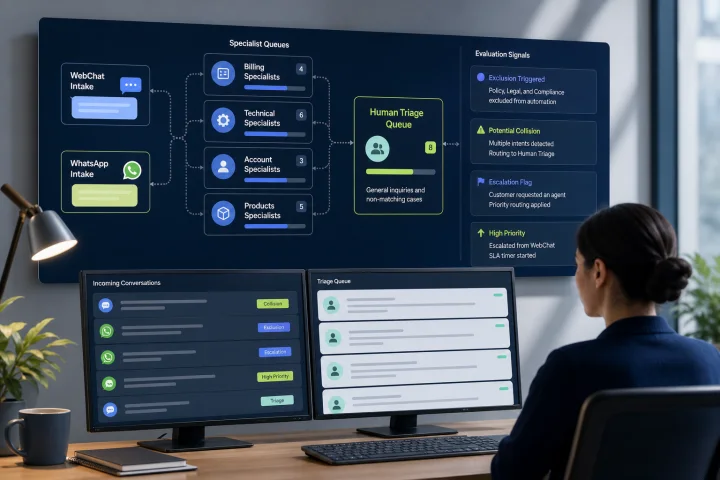
A keyword is a signal, not a complete statement of intent
Keyword routing for customer support can reduce manual sorting, but a word alone rarely establishes what the customer needs. “Charge” may mean an unexpected card payment, a request to charge a device, a shipping fee, or a request for a pricing quote. Sending every message containing that word to Billing creates avoidable transfers and delays.
Treat each rule as an operational decision under uncertainty. The appropriate question is not “Which department owns this word?” but “Is this wording specific enough that automatic assignment is safer than waiting for a person to review it?”
This distinction matters in shared WebChat and WhatsApp operations, where customers may send a short first message, continue a previous issue, change subject midway through a conversation, or use informal wording. A wrong specialist assignment can be more costly than a brief stay in general intake.
- Avoid rules based on department labels alone, such as routing every mention of “account” to Account Management.
- Avoid interpreting a keyword as sentiment, urgency, eligibility, identity, or customer intent unless the message provides sufficient context.
- Make the default outcome for an unclear match a reviewable general queue, not a confident-looking specialist destination.

Decide what is safe to automate before building the vocabulary
Start by listing the request types your teams receive, the destination that can resolve each one, the consequence of a wrong route, and the cost of a short triage delay. Automate only the cases that have recognisable wording, a stable owner, and a low enough misroute risk.
Good initial candidates are narrow, repeatable requests with clear phrases and a known destination. Examples may include a customer explicitly asking to “update delivery address” or “request a copy of my invoice,” if those phrases reliably map to teams in your operation. High-stakes complaints, possible fraud, safety issues, legal requests, account access disputes, and messages with unclear urgency should go to an appropriately trained human review path.
Keep classification separate from assignment when your configuration allows it. First add a label or routing attribute such as “invoice copy request” or “possible account access issue”; then use that attribute, availability, schedules, service-level commitments, and department responsibility to select a destination. This makes it easier to audit why a conversation moved.
- For every proposed route, record: eligible wording, destination, owner, exclusions, priority, fallback queue, and review date.
- Require a named operational owner for each specialist queue and each routing rule.
- Do not automate a route when the specialist team cannot accept or quickly redirect the work.
- Define who monitors the general queue during every supported schedule.

Build a small vocabulary from real customer language
Use a representative sample of resolved conversations, transfer reasons, complaint records, and operator notes to find the phrases customers actually use. Access these records only through authorized roles, use the minimum data needed for the routing purpose, and de-identify or pseudonymize examples where feasible. Set retention and deletion controls for any samples, exports, or test sets used to develop and review rules.
Internal names such as “Revenue Operations” or “Tier 2” are usually poor routing vocabulary because customers do not use them consistently. For each candidate phrase, inspect nearby words and the final resolution. A phrase that appears in multiple resolved categories is evidence that it needs context, not evidence that it should be routed broadly.
Include messages that were transferred, reopened, corrected by the customer, or escalated; these are particularly useful examples of routing failure. Begin with a deliberately small rule set. A short list that has clear ownership and is tested against real messages is safer to operate than a large dictionary of loosely related words.
- Collect exact customer phrases, common abbreviations, and spelling variants from authorized, minimized conversation samples.
- Group phrases by the customer’s requested outcome, not by the team’s internal structure.
- Keep de-identified examples of both positive matches and messages that must not match.
- Remove or narrow terms that produce repeated corrections, transfers, or complaints.
- Apply defined retention controls to vocabulary-development samples and test sets.
Use narrow conditions, exclusions, and documented precedence
Prefer specific phrases and contextual combinations over broad single-word matches. For example, a rule requiring both “invoice” and “copy” is usually more defensible than a rule for “invoice” alone. Where the workflow supports it, require all relevant conditions rather than accepting any one broad indicator.
Add exclusions for known negative context when your routing configuration can express and test them. A customer saying “I did not receive an invoice” may need document help, while “I was charged an invoice fee” may need billing review. The exact exclusions depend on your service model, so they must be validated against your own conversation samples rather than copied as universal rules.
Rule order is operationally significant in many routing systems. Document and validate which rules are evaluated first, whether one match stops later evaluation, and what happens when several rules apply. Do not assume that a platform supports exclusions, precedence, simultaneous-match handling, or automatic selection of the best destination without confirming the current configuration.
- Use precise phrase: “copy of invoice” rather than “invoice.”
- Use contextual combination: “change” plus “delivery address” rather than “address.”
- Use an exclusion or lower-priority path for phrases known to have another meaning, if supported and validated in the configuration.
- Write a precedence table that states the intended winning route for every overlapping condition.
- Retest precedence whenever a rule is added, removed, or reordered.
Design collisions rather than hoping they do not happen
A collision occurs when one message fits multiple routes, such as “My account was charged twice and I cannot log in.” Billing and account access may both be relevant, but routing to either team without an explicit policy can leave the customer repeating their situation.
Choose a collision policy before launch. A simple policy is to send multi-match messages to general triage, where an operator selects the primary owner and preserves the relevant tags. Another is to apply a documented priority for a high-risk review queue. Automatic priority should reflect the potential harm of delay or misdirection, not the political importance of a department.
Do not hide collisions. Where the routing configuration provides match information, retain the matched rules and selected outcome. Where it does not, create an operational record of the reason for the route and the final outcome. Recurring collisions typically indicate a vocabulary problem, an unclear departmental boundary, or a customer journey that should be redesigned.
- Define a collision outcome: human triage, designated priority queue, or a narrowly defined combined workflow.
- Validate whether operators can see matching labels or the reason for the routing decision; otherwise provide an operational record for triage.
- Give triage operators authority to transfer, retag, and flag a rule for review.
- Review collision volume and transfer patterns on a regular operating cadence.
Escalation wording should trigger review, not false certainty
Words such as “fraud,” “urgent,” “unsafe,” “discrimination,” “lawyer,” or “cancel” can be important signals, but they do not prove the same event or urgency in every message. Use them to elevate visibility and direct the conversation to a defined review path, rather than relying on the word to make a final judgment.
Create an escalation taxonomy that matches your organization’s real responsibilities. For each category, state who reviews it, the expected review window, what operators must preserve in the conversation record, and when the case can be transferred onward. If the message requires identity verification, sensitive information handling, or a formal complaint process, make that a human-operated step.
A customer should never be trapped in an automated route when they say the routing is wrong. Include an obvious correction path, such as an option to request another team or a message that tells the customer how to reach an operator. Validate whether the current configuration can recognize particular handoff wording; regardless of automation, people remain responsible for deciding ambiguous, exceptional, or sensitive cases.
- Route high-risk wording to review, not directly to an irreversible conclusion.
- Set an accountable escalation owner and a backup owner for each review category.
- Preserve the original message and routing history when transferring a case.
- Treat customer corrections, requests for a person, and repeated unanswered messages as human-handoff signals through validated automation or operator review.
Support multilingual wording without guessing
Build language coverage from observed customer messages and approved translations, not from assumptions about literal equivalents. The same word can vary by region, script, formality, or product context. If language identification or meaning is uncertain, retain the message in general intake or offer a clear language-selection and human-assistance path.
For web intake flows, present language choices clearly and ensure the language of content is properly identified for assistive technologies. If a flow detects an input error, explain the problem in text and provide a correction suggestion when one is known and appropriate. Do not make customers solve a routing problem through an inaccessible or unexplained error state.
Do not route based only on presumed language preference. A customer may write one message in one language and request help in another. Confirm the preferred language when it matters to the handoff, and give the receiving team the information needed to continue without forcing repetition.
- Maintain language-specific phrase lists, exclusions, and test sets.
- Test spelling variation, mixed-language messages, transliteration, and short messages.
- Provide a human fallback when the language cannot be handled confidently.
- Review whether language-based rules create disproportionate transfers or longer waits.
Operate a general-intake queue as a safety control
General intake is not a routing failure. It is the controlled destination for unclear messages, collisions, unsupported languages, customer corrections, out-of-hours specialist requests, and cases where no qualified destination is available. Staff it with operators who can clarify the need, apply tags, transfer the conversation, and initiate escalation.
In webchat.vip, teams can organize operators, departments, routing, schedules, service levels, templates, and tags in a shared inbox for WebChat and WhatsApp conversations. Automated flows can collect validated responses, branch, transfer, and hand off to people. Configure and test the available capabilities so that an uncertain automation outcome reaches a monitored human queue rather than ending the customer journey; do not assume that specific keyword operators, exclusions, collision visibility, precedence controls, or phrase detection are available without validating the current configuration.
Make the handoff visible to the customer where appropriate. A concise message can acknowledge that the case is being reviewed and avoid implying that the first automated categorization was a final decision. Do not ask for sensitive data merely to improve a keyword match.
- Every route must have a fallback destination and a monitored owner.
- Define out-of-hours behavior for specialist queues and escalations.
- Allow operators to override routing and capture a reason for the override.
- Give customers a direct way to request human help or correct the destination.
- If a queue cannot accept work, divert to the defined overflow or triage path rather than leaving the conversation unowned.
Frequently asked questions
What is keyword routing for customer support?
Keyword routing uses words, phrases, or contextual conditions in an incoming message to assign or label a support conversation. It is most reliable when rules are narrow, tested against real conversations, and backed by a human triage route for uncertain cases.
Should every keyword send a conversation directly to a department?
No. Broad or ambiguous terms should usually label the conversation, raise a review flag, or send it to general intake. Direct assignment is best reserved for wording that reliably identifies a request and has a clear, available owner.
How should we handle a message that matches two routing rules?
Define the outcome in advance. Send the message to human triage, apply a documented high-risk priority, or use a tightly defined combined workflow. Record the matched rules where the configuration provides them, or record the routing reason and final destination so recurring overlaps can be corrected.
What should happen when a customer says they were sent to the wrong team?
Treat this as a human-handoff signal. Preserve the conversation context, transfer or triage the case promptly, let the operator override the prior route, and record the correction as evidence for reviewing the rule.
How can webchat.vip support a guarded routing design?
webchat.vip provides a shared inbox for WebChat and WhatsApp, along with organization of departments, routing, schedules, service levels, templates, and tags. Its automated flows can branch, collect validated responses, transfer conversations, and hand off to people; validate the current configuration for any specific keyword, exclusion, collision, or precedence logic, and use a monitored general-intake and escalation process.
Sources and further reading
Primary and authoritative references used to verify the factual foundation of this guide.
- Configure work classification rulesets for unified routing — Microsoft Learn
- Configure intent-driven routing — Microsoft Learn
- What is the difference between "meet all" and "meet any" conditions? — Zendesk Help
- How Does Skills-Based Routing Work? — Salesforce Help
- Routing Configuration Settings — Salesforce Help
- ISO 10002:2018 — Quality management — Customer satisfaction — Guidelines for complaints handling in organizations — International Organization for Standardization
- AI RMF Playbook — Measure — National Institute of Standards and Technology
- Web Content Accessibility Guidelines (WCAG) 2.2 — W3C
- Understanding Success Criterion 3.1.2: Language of Parts — W3C Web Accessibility Initiative