How to Write Customer Support Waiting and Transfer Messages That Set Clear Expectations
Waiting, queue and transfer messages are operational commitments, not filler copy. Learn how to define service states, set credible timing and keep a clear route to human help.
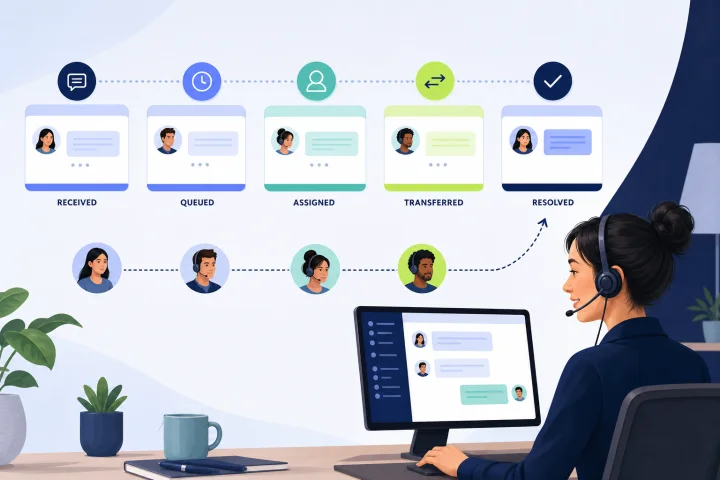
Why silence creates customer effort
A customer who has sent a message but cannot tell whether it was received, queued or transferred has to infer the next step. Common responses are to send the same message again, try another channel, ask for an update or abandon the conversation. Those actions increase demand while making the original issue harder to handle.
A polite acknowledgement is not enough if it does not reflect the real operating model. Status messages should tell customers what is known now, what will happen next and what they can do if the route is unsuitable. Treat them as part of complaints handling and service design, then review them as operations change.
- Do not use a wait message to hide a queue, a handoff or an outage.
- Do not imply that an agent is actively working on a case unless one has actually been assigned.
- Do not call an issue resolved merely because impact has been reduced; mitigation and a permanent fix are different states.
- Use the same operational vocabulary across automation, agents, help content and escalation procedures.

Map the customer-visible service states first
Write messages only after agreeing the states that customers can genuinely encounter. Internal routing can be complex, but customer-facing states should be few, distinct and actionable. A state must have a clear entry condition, owner, exit condition and message rule.
Avoid exposing internal labels such as team codes or ticket statuses without explanation. For example, an internal pending state may mean the team needs information from the customer; an on-hold state may mean it needs input from another team. Customers need the practical meaning, not the back-office label.
- Received: the message arrived. State whether a reply is expected and what happens next.
- Queued: the request is waiting for a suitable responder. Identify the queue or service where useful, without inventing a reply time.
- Assigned: a named person or team owns the next response. Use this only when assignment is real.
- Transferred: a different team or specialist now owns the next action.
- Awaiting customer: explain exactly what information or action is needed and why.
- Delayed: explain the known impact, the next update point or update trigger, and any safe workaround.
- Closed: confirm the outcome or closure reason and explain how to reopen or seek further help where that route exists.

Use a five-part status-message structure
Useful customer support waiting and transfer messages answer the questions a customer would otherwise ask: What happened? Who owns the next action? What happens next? When should I expect another update, if known? What can I do now? Keep the wording plain and specific to the situation.
The timing element is conditional. If you cannot support a reliable response estimate, say when you will update the customer instead, or describe the event that will trigger the next message. An honest absence of an ETA is more useful than a precise-looking estimate that teams cannot meet.
- Current state: “Your message has been received and is waiting for the billing team.”
- Next action: “A billing specialist will review the account details you shared.”
- Ownership: “The billing team now owns the next reply.”
- Timing: give an ETA or window only when it is based on current service data and the applicable schedule.
- Alternative path: offer a relevant self-service step, another contact method or escalation route when appropriate.
Choose an ETA, a time window or no estimate deliberately
An ETA is a commitment, not a courtesy phrase. Use one only when historical demand, handling-time data and the channel schedule support it, and when the team can monitor missed commitments. A time window is often safer when work depends on triage, a specialist or an external dependency.
Use no response estimate when the duration is genuinely unknown, the queue is volatile or an incident is still being assessed. Replace it with a credible update commitment, such as a stated review point, or an event-based promise such as “We will update this conversation when we have confirmed the scope.” Do not promise resolution timing when you can only promise another communication.
- Use a specific ETA when capacity and the relevant business-hours schedule make it dependable.
- Use a window when variation is expected: “We expect to reply within the next business day.”
- Use an update point when duration is unknown: “We will post an update here by 16:00 local time, even if the investigation is still ongoing.”
- Use an event-based update when a clock time is not credible: “We will update you when the specialist review is complete.”
- Never say “shortly,” “as soon as possible” or “a representative will be with you” unless your operating practice gives those phrases a defined and monitored meaning.
Write queue messages without guaranteeing a response
A queue message should confirm receipt and describe the next handling step without overstating availability. “An agent will be with you soon” can be read as a guarantee, particularly outside operating hours or during peaks. It also becomes misleading if the conversation is later routed elsewhere.
Name the service condition clearly. If the team is closed, say so. If the conversation is queued, say it is queued. If a response is only available for certain request types, do not present the acknowledgement as universal support coverage.
- Safer pattern: “We have received your message. Our support team reviews new messages during [published hours]. We will reply here when your request reaches an available agent.”
- Peak-demand pattern: “We have received your request. Replies are taking longer than usual today. Please do not send the same details again; they are attached to this conversation.”
- Outside-hours pattern: “Our live support team is currently offline. Your message is recorded for review when the next scheduled coverage period begins.”
- Failure mode: a generic acknowledgement appears even when routing failed. Add a monitoring and fallback procedure so this message is not mistaken for successful case creation.
Make transfer messages preserve context and ownership
A transfer message should prevent the customer from wondering whether they have been passed around or need to start again. Explain why the handoff is happening in customer terms, identify the new owner at an appropriate level and confirm what information moves with the conversation.
Do not ask a customer to repeat details already present in the conversation. A new team may need clarification, but it should first review the history and state a focused question. If the transfer is not complete, do not say that another team owns the case yet.
- Transfer template: “I’m transferring this conversation to our [team] because they handle [topic]. They can see the details you have already shared. Their next reply will appear in this conversation.”
- Specialist-review template: “Your request needs a specialist review. We have sent the conversation and the information you provided to the [team]. We will update you here when their review is complete.”
- Clarification template: “The [team] has reviewed the conversation and needs one detail to continue: [specific question].”
- Failure mode: a transfer is announced but no destination accepts it. Define an owner and alert path for unaccepted or aging transfers.
Separate automation from a named human reply
Customers should be able to distinguish an automated acknowledgement from a message written by an operator. This protects trust and helps them judge whether replying immediately will help. Automation can confirm receipt, collect validated information, provide a known next step, branch a flow and hand off to people; it should not pretend to be a person.
When a human joins, make that transition clear. A named operator can confirm that they have reviewed the prior messages and state the next action. If an automated flow gathers information, explain why each requested item is needed and avoid collecting data that is unnecessary for the request.
- Automated acknowledgement: “Automated message: we have received your request and are checking the right route for it.”
- Human join message: “Hi, I’m Sam from Support. I have reviewed the details you shared. I will now check [specific next action].”
- Do not use a human name, typing indicator or first-person phrasing in automation if it could reasonably imply that a person has read the conversation.
- Provide a way to stop or bypass a flow when the customer needs assistance that the flow cannot safely provide.
Plan for outside hours, unexpected delays and incidents
Schedules, holidays and routing rules must agree with the language customers see. Review every channel, department and coverage period. A message that promises a weekday reply is inaccurate if a local holiday or a different schedule applies to the assigned team.
For an incident, communicate the impact that is known, the current progress toward mitigation, any safe workaround and the next communication timing. An early notice can be brief when rapid notification matters; update it as facts are confirmed. State that service is restored only when you have evidence that the impact has ended, rather than when a workaround merely reduces it.
- Outside hours: identify that live coverage is unavailable and state the next coverage period only if it is accurate for that service.
- Unexpected delay: explain the delay without blaming the customer or using vague technical jargon; provide an update point or alternative route.
- Service interruption: state the affected function, known customer impact, workaround if available and next update commitment.
- Escalate internally when an operational message no longer matches reality, such as a missed update time, failed routing rule or prolonged queue.
Frequently asked questions
How long should a customer wait message be?
Usually one to three short sentences. Include the current state, the next action and only a timing statement that the service can support. Add an alternative path when the customer may need urgent or different help.
Should every queue message include an ETA?
No. Use an ETA only when it is credible for the applicable channel, team and schedule. If duration is unknown, provide a specific next update point or state the event that will trigger an update instead.
What should a transfer message say?
Explain why the transfer is needed, who owns the next action, confirm that the conversation history moves with the case and state where the next reply will appear. Do not make the customer repeat information already provided.
When should a customer be offered human escalation?
Offer or preserve a human route when automation cannot safely handle the request, when the customer is blocked, when an error or delay has material consequences, when repeated contacts show the issue remains unresolved, or when policy requires specialist review. Make the route and expected next step clear.
How can teams test whether these messages work?
Compare message wording against real routing, schedules and service levels before launch. After launch, inspect repeat contacts, abandonment, transfers, first-response and assignment timing, ratings and conversation feedback. Review samples of missed estimates, unaccepted transfers and escalations, then revise the message or the operation causing the mismatch.
What accessibility checks apply to web status messages?
Use plain language, ensure messages have enough context when announced by assistive technology and test dynamic updates without unwanted focus movement. For web interfaces, role=status can communicate status updates politely to assistive technologies. Keep repeated human-contact, self-help and automated-contact mechanisms in a consistent relative order where they appear across pages, and identify page and language changes programmatically as required by WCAG 2.2.
Sources and further reading
Primary and authoritative references used to verify the factual foundation of this guide.
- ISO 10002:2018 — Quality management: Customer satisfaction: Guidelines for complaints handling in organizations — International Organization for Standardization
- Lifecycle of an incident — Google Cloud Documentation
- Web Content Accessibility Guidelines (WCAG) 2.2 — W3C Web Accessibility Initiative
- ARIA22: Using role=status to present status messages — W3C Web Accessibility Initiative
- Set up and manage user support — GOV.UK Service Manual
- Error message — GOV.UK Design System
- About open vs. pending and on-hold tickets — Zendesk Help
- Setting your schedule with business hours and holidays — Zendesk Help
- Analyzing your messaging tickets — Zendesk Help