Customer Support Response Templates: How to Stay Consistent Without Sounding Robotic
Build support templates as controlled, editable building blocks that make the next customer action clear, protect sensitive cases and preserve agent judgment.
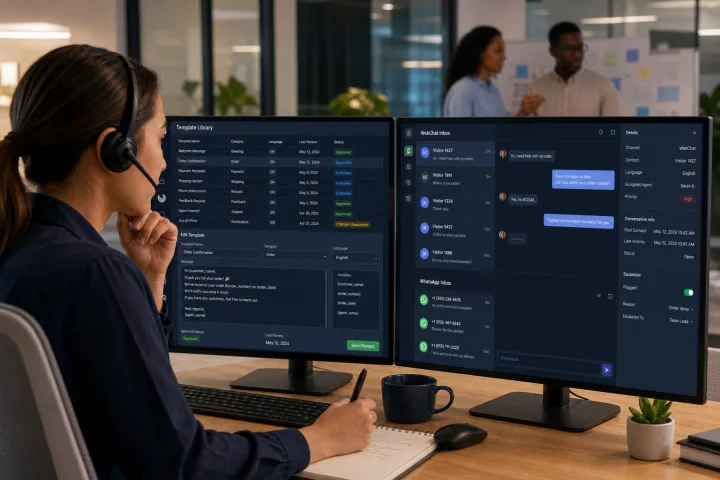
Templates solve repetition, not judgment
Customer support response templates are useful when the same low-risk explanation, request or next step appears across many conversations. They help teams use consistent language, reduce avoidable typing and give customers a clearer path forward. In a shared inbox, they also make service less dependent on one operator remembering the preferred wording.
The failure mode is treating a template as a complete script. A fast reply that ignores the customer’s actual question, account context or emotional state can create more work: the customer corrects the agent, repeats information or reopens the issue. Templates should therefore be controlled building blocks that an operator checks and completes before sending.
A useful test is simple: if the reply could be sent unchanged to nearly anyone, it is probably too generic. The reusable part should cover the repeatable action; the case-specific details, decision and tone remain editable.
- Use templates for consistent wording and clear operational steps.
- Require operators to verify context before sending.
- Keep the customer’s issue, relevant dates, references and requested action editable.
- Do not count a sent template as a resolved customer need.

Keep templates, automation, knowledge articles and operator judgment separate
An internal response template is a draft an operator selects and adapts. It does not decide the case, verify identity or authorize a consequential action. Operator judgment remains responsible for matching the response to the conversation and escalating when the template no longer fits.
Automation has a different role. In webchat.vip, automated flows can send messages and files, collect validated responses, branch, transfer and hand off to people. Use flows for defined, repeatable journeys with clear routing and handoff conditions, rather than disguising an uncertain policy decision as automation.
A knowledge article is longer-lived reference material intended to explain a topic. A template can link to or summarize an article, but should still state the immediate next step. Do not force a customer to search an article when one specific action is required.
For WhatsApp, distinguish your internal agent templates from channel-provider-governed outbound message templates. Provider rules can apply outside an active customer-service window, and submitted templates may be subject to approval and may need replacement rather than editing. Confirm the rules and configuration that apply to your provider before designing a workflow.
- Internal template: reusable operator wording, edited before send.
- Automated flow: defined collection, branching, transfer or handoff process.
- Knowledge article: durable self-service explanation.
- Human review: exceptions, ambiguity, risk, complaints and consequential decisions.

Choose template candidates by repeatability and risk
Start with conversation moments, not with individual operators’ favorite replies. Review logs and group contacts by customer need and workflow stage: opening acknowledgement, information request, status update, troubleshooting step, handoff, follow-up and closure. webchat.vip provides a shared inbox for WebChat and WhatsApp conversations, and teams can organize operators, departments, routing, schedules, service levels, templates and tags. Use those operational categories to make the library findable.
The best candidates are frequent, stable and low-risk. The expected answer should be known, the customer should be able to take a clear next action, and an incorrect send should be easy to correct. For example, a request for an order reference, an explanation of where to find a setting, or a handoff acknowledgement may be suitable if the wording is accurate for the customer’s case.
Avoid templating simply because a conversation is common. A frequently occurring billing dispute may be high risk; a common issue can still require a human review.
- Candidate checklist: Is the scenario frequent and recognizably similar?
- Candidate checklist: Is the policy and wording stable?
- Candidate checklist: Can an operator verify the required facts quickly?
- Candidate checklist: Is there a single, plain-language next step?
- Candidate checklist: Would an incorrect reply be low impact and easily recoverable?
- If any answer is no, use a guided process or human review instead of a ready-to-send template.
Do not use unreviewed canned replies for sensitive or consequential cases
Some topics need a controlled path, not a generic reply. Identity verification, account recovery, password or credential issues, payment details, complaints, sensitive personal data and consequential account changes all carry higher privacy, security, financial or reputational risk. A template may acknowledge the request and explain the next safe step, but it must not substitute for the organization’s approved procedure.
Do not ask customers to send passwords, authentication codes, account credentials or unnecessary personal information in chat. Request only information directly necessary for the immediate support purpose. Support transcripts and operational logs may make sensitive data visible beyond the immediate conversation, so the wording of a routine request matters.
Do not casually invite card numbers into WebChat, WhatsApp, email or other end-user messaging. The PCI Security Standards Council notes that a channel used to receive or send a primary account number is subject to applicable PCI DSS protections. Direct the customer to the organization’s approved payment process instead.
For recovery, identity verification or a change that can materially affect an account, transfer to the designated trained team or prescribed verification workflow. The escalation reply should set expectations without disclosing account details or revealing security checks.
- Escalate immediately when the customer supplies or is asked to supply credentials, codes or payment-card data.
- Escalate complaints involving alleged harm, discrimination, threats, legal demands or public escalation according to your policy.
- Escalate when identity cannot be safely verified or a customer requests account recovery or access changes.
- Pause the template when its instructions conflict with the current case, policy or approved process.
Use a human template structure, not a wall of canned text
A reliable template has four parts: purpose, editable facts, a plain-language next step and an escalation cue. This structure is short enough for live messaging but complete enough to guide the customer. It also makes it obvious which words an operator must change.
Use explicit wording. “Please try again” leaves the customer without a correction path. Instead, name the action, where to take it, what to enter or select, and what to do if the step fails. W3C guidance emphasizes clear instructions before or next to an activity, identification of input errors and safe correction suggestions.
For a request template, collect only what is needed and explain why. For a troubleshooting template, give one numbered sequence when order matters. For a delay update, state what is known, what will happen next and when the customer should return if no update arrives. Never invent a date, outcome or policy exception to fill an editable field.
- Purpose: “I can help check the delivery status.”
- Editable facts: “[order reference]”, “[current status]” and “[relevant date]”.
- Next step: “Please send the order reference shown in your confirmation.”
- Escalation cue: “If the order contains a payment or identity concern, I will route this to the appropriate team.”
- Pre-send check: Remove all brackets, placeholders and instructions intended only for the operator.
Write for WebChat, messaging continuity and multilingual use
WebChat usually rewards short, scannable replies. Put the requested action first, use short paragraphs and use numbered steps when sequence matters. Each WebChat channel in webchat.vip has an installable, customizable and multilingual widget, so confirm that template wording fits the language and interface used by that channel.
WhatsApp conversations may continue over time, so restate enough context that the next operator and customer can follow the thread. Do not assume that a reply remains appropriate just because it was suitable earlier in the conversation. Where a provider-governed WhatsApp template is required, its variables, category and approval status are channel-provider concerns; the internal process should identify the approved version and replacement path.
Translation is not a word-substitution exercise. Maintain a source template, identify the approved languages, and have a qualified reviewer check that the translated instruction preserves the action, privacy boundary and escalation condition. Where the team cannot reliably support the customer’s language, use a brief fallback that says what assistance is available and routes to a person or approved language process.
- Keep one instruction or question per short message where possible.
- Avoid idioms, unexplained acronyms and culturally specific shorthand.
- Use the same reference number and case facts across messages.
- Validate every placeholder and translation before publication.
- Provide a human handoff when language comprehension creates a risk of misunderstanding.
Run templates as controlled operational assets
Every operational template needs a named owner, a purpose, a risk classification, an approval record, a review date and a retirement rule. The level of approval should be proportionate to risk. A low-risk acknowledgement may need a support operations review; a payment, recovery or complaint template should involve the accountable policy, security, privacy or legal stakeholders defined by your organization.
Use a small change-control routine. Draft the message, test editable fields and links, check accessibility and language, approve it, publish it to the shared library, and record when it must be reviewed. NIST configuration-management guidance supports assigning authority to review and approve changes with formality appropriate to the system’s criticality.
Retire templates when policy, process, product instructions or channel requirements change; when a template repeatedly causes confusion; or when a provider-governed template has been replaced. For provider-submitted WhatsApp templates, a change may require a new template and retirement of the obsolete one rather than an in-place edit. Keep the internal library aligned with the active approved version.
Use role-based access in the template library where possible: most operators can use approved templates, designated leads can propose changes, and named owners approve publication. Preserve a simple change record so quality assurance can determine what wording was in use at the time of a conversation.
- Template record checklist: name, customer need, workflow stage and channel.
- Template record checklist: owner, approver, version and review date.
- Template record checklist: editable fields, prohibited uses and escalation trigger.
- Template record checklist: source policy or process, language versions and retirement condition.
- Release check: test with missing data, wrong data, a sensitive-data disclosure and a request outside scope.
Measure reduced customer effort, not just higher reply volume
Fast sending is a productivity signal, not proof that a template works. Build a measurement design around whether the reply helped the customer progress with less effort. webchat.vip records operational analytics, conversation logs, ratings and exportable reports, which can support regular review alongside quality assurance sampling.
For each high-volume template, inspect a sample of conversations. Did the reply include a complete next step? Did the customer have to repeat information already given? Did the customer ask what the message meant? Was the conversation transferred, reopened or rated poorly? These are internal operational signals, not universal benchmark targets.
Review results by template version, conversation type, channel and language. A template with high use but frequent clarification is a candidate for revision. A template associated with negative feedback should be investigated promptly. On WhatsApp, negative user feedback can also affect a provider-governed template’s status; paused or deactivated provider templates can cause messages to fail.
When metrics show deterioration, do not merely rewrite the first sentence. Read the surrounding conversations, find the decision point that caused friction and determine whether the scenario should remain templated at all.
- Productivity signals: template usage, handling time and time to first meaningful reply.
- Customer-effort signals: complete next step, repeated information, clarification requests, transfers and reopenings.
- Experience signals: ratings, complaint themes and sampled conversation quality.
- Control signals: stale templates, failed placeholders, expired links and provider-template status where relevant.
- Review cadence: inspect new or changed templates early, then review risk and performance on a defined schedule.
Frequently asked questions
What makes a customer support response template sound human?
A human template is specific to a real support moment, has visible fields for case facts, gives one clear next action and leaves room for the operator to acknowledge the customer’s context. It avoids pretending to know facts that have not been verified.
Which customer support replies should not be fully templated?
Do not use unreviewed canned replies for identity verification, account recovery, credentials, payment-card information, sensitive personal data, complaints or consequential account changes. Use a controlled procedure and escalate to the designated human team when required.
How should a team organize templates in a shared inbox?
Organize them by customer need and workflow stage, such as clarification, troubleshooting, status update, handoff and closure. Add clear names, ownership, channel scope, risk level and review dates so operators can select the right approved building block quickly.
How can we tell whether templates are helping customers?
Look beyond usage volume. Review whether customers receive a complete next step, repeat information, ask for clarification, get transferred, reopen the contact or leave negative feedback. Compare those signals by template version, channel, language and conversation type.
Are internal response templates the same as WhatsApp message templates?
No. An internal response template is an operator-facing draft. WhatsApp outbound templates can be governed by the channel provider, including approval, category and customer-service-window rules. Confirm your provider’s current requirements before using them in a workflow.
What is the correct human escalation path for a risky conversation?
Stop using the general template, acknowledge the request without collecting unnecessary sensitive data, explain the safe next step, and route the conversation to the trained department or approved verification process. Record the handoff reason so the receiving team has the necessary context.
Sources and further reading
Primary and authoritative references used to verify the factual foundation of this guide.
- Web Content Accessibility Guidelines (WCAG) 2.2 — W3C Web Accessibility Initiative
- Use Clear Step-by-step Instructions — W3C Web Accessibility Initiative
- NIST SP 800-122: Guide to Protecting the Confidentiality of Personally Identifiable Information — National Institute of Standards and Technology
- NIST SP 800-63B: Digital Identity Guidelines—Authentication and Authenticator Management — National Institute of Standards and Technology
- NIST SP 800-128: Guide for Security-Focused Configuration Management of Information Systems — National Institute of Standards and Technology
- OWASP ASVS 5.0—General Logging — OWASP Foundation
- Are entities allowed to request that cardholder data be provided over end-user messaging technologies? — PCI Security Standards Council
- Send WhatsApp notification messages with templates — Twilio
- Key Concepts and Terms for the WhatsApp Business Platform with Twilio — Twilio