When a Customer Replies After Closure: A Reopening Policy Guide
A practical framework for deciding whether a late customer message should reopen a closed conversation, be handled as related follow-up work, start a new case, or receive human review.
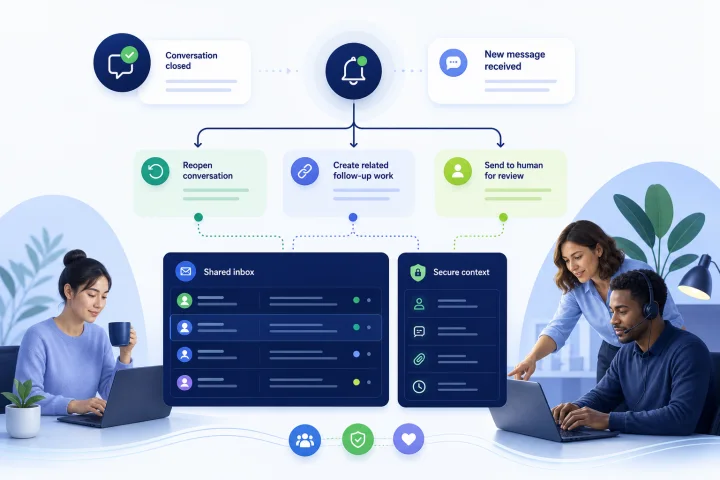
Why closure does not always mean the customer need is finished
Closing a conversation is an operational decision: the team believes the stated request has been answered, transferred, or completed. It is not proof that the customer has no remaining need. A later message may supply requested information, challenge an outcome, report that a promised action did not happen, or raise an entirely separate issue.
A useful customer support conversation reopening policy prevents two opposite failures. If every reply automatically reopens old work, queues, ownership, service-level tracking, and closure reporting can become misleading. If every reply becomes a fresh case, the customer may have to repeat their story and the team can miss prior commitments.
Treat the status of the original conversation and the classification of the new inbound message as separate decisions. First determine what the message means. Then decide how the inbox should record and route the work.
- Closure is a status, not a guarantee of resolution.
- A late reply can be a continuation, a new request, a correction, or a safety-critical exception.
- The policy should preserve useful context without copying unnecessary personal or sensitive information into multiple records.

Define three outcomes before configuring routing
Use only a small set of outcomes that agents, supervisors, and reporting teams can apply consistently. The goal is not to make every message fit a rigid clock rule; it is to make the handling decision visible and reviewable.
In webchat.vip, teams can work from a shared inbox and organize operators, departments, routing, schedules, service levels, templates, and tags. Define how your organization will identify each selected outcome in the available record, tags, or procedure, and verify the specific configuration and reporting options before relying on them for reopening analysis.
- Reopen the closed conversation: use this when the incoming message directly continues the same unresolved matter, responds to a request made by the team, or concerns a commitment recorded in the original conversation.
- Handle as related follow-up work: use this when the new message is related to the prior contact but needs separate ownership, service-level treatment, investigation, or reporting. Where the relevant prior record is available and policy permits its use, retain a necessary reference or concise summary of the connection using your organization’s approved procedure.
- Start a new case: use this when the customer has raised a clearly independent subject. A new case should not be treated as a failure merely because the customer contacted the team before.
- Route for human review: use this as an override for ambiguity, complaints, suspected security issues, vulnerable-customer concerns, or any message that could cause material customer harm if classified incorrectly. Human review can lead to any of the three record outcomes.

Make the decision using continuity, time, ownership, and impact
A reopening window is useful as a review cue, but it is weak evidence on its own. A customer can reply minutes after closure about a new order, or weeks later with information that the team explicitly requested. Review the substance of the message before treating elapsed time as decisive.
Use a short decision checklist at the point of triage. If the answer is unclear, do not force an automatic classification. Send the item to an accountable person or specialist queue with the previous conversation available for review where access, identity matching, and retention rules permit.
- Issue continuity: Does the message answer a question, provide requested evidence, dispute the same decision, or report failure of the same promised action? If yes, reopening is often appropriate.
- Elapsed time: Is the reply within the team’s chosen review window? Use the window to prioritize review, not as automatic proof that two issues are related. Platform timing can be based on the last customer-visible activity rather than the moment an agent selected Closed.
- Ownership continuity: Is the original department still responsible and available? If not, route by role or department rather than waiting for the original operator.
- Customer impact: Could delay, loss of context, or an incorrect decision create financial, safety, privacy, access, or trust harm? If yes, use review or specialist escalation.
- Work type: Does the new message require a separate investigation, approval, or promised delivery date? Related follow-up work may be clearer than reopening a general inquiry.
- Evidence quality: Can the relationship be established from the message and the available record? If not, ask a focused clarifying question or route for review.
Set timing windows carefully, especially across WebChat and WhatsApp
Choose operational review windows by issue type, not only by channel. A simple question may reasonably have a short continuation window. A refund, investigation, accessibility issue, or promised follow-up may need a longer window because the customer’s next message can be part of the same obligation.
Do not confuse an inbox policy with a channel-provider messaging rule. WhatsApp Business policy restricts business-initiated conversations outside the 24-hour customer service window to approved message templates. Your internal handling decision can still preserve a necessary record of related work where permitted, but outbound handling must follow the applicable WhatsApp rules.
Document exactly which event starts each timing rule. Some systems base reply behavior on the most recent customer-visible activity, not on when an agent closed the conversation. Without this definition, agents may expect an immediate reply to reopen a record and instead see a new conversation created.
- Define a standard review window for routine questions.
- Define longer review windows for tickets, investigations, and commitments that may remain unresolved after the initial interaction.
- Record the event that starts the window: for example, last customer-visible message, last customer message, or closure timestamp.
- State whether the window affects routing only, customer ability to reply, automated acknowledgements, or all of these.
- Test boundary cases: a reply just before the window, just after it, and after a delay following a team promise.
Create non-negotiable exceptions and a human escalation path
Certain messages must bypass routine reopen-versus-new-case logic. The risk is not limited to the subject line or a keyword. The FTC has documented an example in which a security warning was misclassified by a general customer-service system, automatically answered, and marked resolved. Automation should therefore detect possible exceptions and route them to a person rather than resolve them.
Write a role-based escalation path. Do not depend on one named agent being online. The receiving operator should know who owns the next decision, what information may be recorded, how to acknowledge the customer, and when a supervisor or specialist must take over.
Support should not present itself as an emergency-response service. For an imminent threat of harm or emergency, follow local emergency procedures and, where appropriate, direct the customer to emergency services or another appropriate urgent-response resource.
- Complaints, disputes, and alleged broken promises: route to the designated resolution owner; preserve necessary dates, contacts, and commitments in the existing record or approved related-work record.
- Suspected account compromise, fraud, security vulnerabilities, or privacy concerns: stop normal automation, avoid requesting unnecessary sensitive details, and send to the security or privacy escalation route.
- Vulnerable customers, threats of harm, safeguarding concerns, or urgent access needs: route to a trained human according to the organization’s safeguarding and emergency procedures.
- Legal, regulatory, or formal-record requests: send to the appropriate authorized team and preserve only the records required by the organization’s policy.
- Unclear high-impact messages: assign a supervisor review instead of asking the customer to choose a category that they may not understand.
Use customer language that acknowledges history without making assumptions
A good reply tells the customer what will happen next and avoids claiming the issue is understood before it has been checked. Where the assigned team has access to the relevant earlier contact and policy permits its use, it can also acknowledge that history. This protects trust when the late message turns out to be a different matter.
Use templates as starting points, then require agents to adjust them when the customer’s circumstances or risk level require a human response. webchat.vip supports templates and automated flows that can collect validated responses, branch, transfer, and hand off to people; use those capabilities to simplify routine intake, not to eliminate judgment.
- Reopen message: “Thanks for getting back in touch. We’re reviewing your update as part of your request and will let you know the next step.”
- Related-work message: “Thanks for the additional details. The right team will review this follow-up and will let you know the next step.”
- New-case message: “Thanks for contacting us again. Your latest message appears to be about a different matter, so we’re handling it as a new request.”
- Review message: “Thanks for flagging this. We’re sending your message to the appropriate team for review. Please do not send passwords, full payment details, or other unnecessary sensitive information in this chat.”
Design automation to assist triage, not to make irreversible judgments
Automation can support routine intake by sending messages and files, collecting validated responses, branching, transferring, and handing conversations to people. Before implementing any rule beyond those documented capabilities, verify that the specific configuration is supported and that it can be reviewed by the responsible team.
Build a safe fallback for conversations that do not fit a configured flow or need a person’s assessment. Provide a visible route to human review, and do not use automation to silently resolve an ambiguous complaint, security report, or sensitive disclosure. Preserve the original customer wording for the reviewer where necessary, but do not duplicate sensitive content unnecessarily across tags, notes, and related records.
- Use explicit, supported flow inputs, such as a customer-selected issue type or a submitted case reference, only where the organization has verified the relevant configuration and routing rule.
- Do not use elapsed time alone to force a new category.
- Provide a human-review route for complaints, security or privacy concerns, suspected fraud, safeguarding issues, threats of harm, urgent access needs, and other high-impact matters.
- Validate collected responses and only ask for information needed for the specific next step.
- Test configured flows against ambiguous examples, typo-filled messages, multiple issues in one reply, and messages received outside normal schedules.
- Provide a visible handoff route to a person whenever automated questions do not fit the customer’s situation.
Frequently asked questions
Should every customer reply after closure reopen the original conversation?
No. Reopen only when the message substantially continues the same matter or responds to a documented request or promise. Use an approved related-work procedure for related but separately managed work, a new case for an independent issue, and human review when the relationship or risk is unclear.
How long should a conversation reopening window be?
Set a window by work type and use it as a triage rule rather than a conclusive relationship test. Routine questions may have a shorter window, while investigations, tickets, complaints, and promised follow-ups often need longer review periods. Define the timestamp that starts the window and test boundary cases.
What should happen if the original agent is not working?
Route the work to the original department’s on-duty queue or to the specialist role now accountable for the issue. A supervisor or triage owner should resolve unclear ownership. Do not leave reopened work dependent on the availability of one individual.
How should WhatsApp affect the policy?
Separate your internal case policy from WhatsApp’s messaging rules. WhatsApp Business policy restricts business-initiated messages outside the 24-hour customer service window to approved templates. Keep the handling and ownership decision clear, then ensure any outbound message complies with the channel rule.
How should reopened conversations appear in reports?
Define reopening, repeat-contact, and genuinely new-issue measures before reporting, then verify that your platform configuration can identify the required outcomes. Closure counts may measure closure events rather than unique cases, so one conversation that is closed, reopened, and closed again can create more than one closure event. Review rates by issue type and process step before attributing blame to individual operators.
When must automation hand the conversation to a person?
Automation should hand off when a configured flow does not fit the customer’s situation and for complaints, security or privacy concerns, suspected fraud, safeguarding issues, threats of harm, urgent access needs, and any matter where a wrong classification could materially harm the customer. The escalation should go to a named role or queue with a clear next-action deadline. For an imminent emergency, follow local emergency procedures and direct the customer to emergency services where appropriate.
Sources and further reading
Primary and authoritative references used to verify the factual foundation of this guide.
- WhatsApp Business Policy — WhatsApp
- Prevent replies after you close a conversation — Intercom Help Center
- Replying to closed email conversations — Intercom Help Center
- Conversations reporting — Intercom Help Center
- Close a conversation — Intercom Help Center
- Start with Security: A Guide for Business — Federal Trade Commission
- Solving Problems With a Business: Returns, Refunds, and Other Resolutions — Federal Trade Commission
- FTC Safeguards Rule: What Your Business Needs to Know — Federal Trade Commission
- Principle (c): Data minimisation — Information Commissioner's Office
- How we respond to an incident — Atlassian