How to Design Chat Inactivity Reminders and Closure Rules Customers Understand
A practical framework for treating customer silence carefully, routing stalled chats correctly, and making closure messages clear, reversible and accountable.
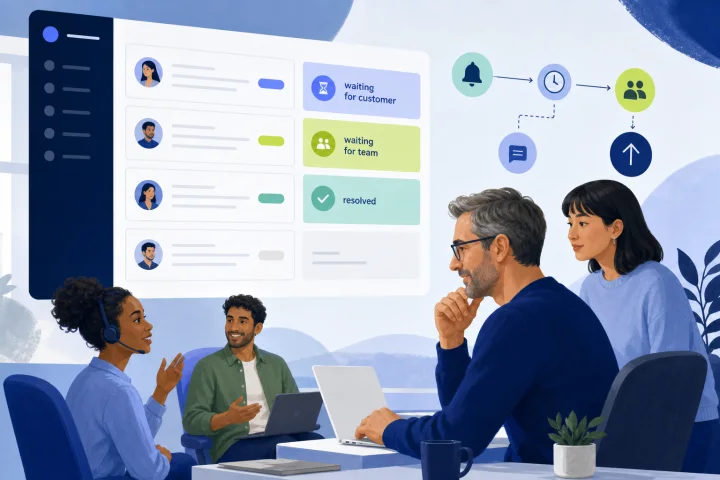
Inactivity is not the same as resolution
A customer who stops replying may be satisfied, but they may also be interrupted, unable to access the chat, confused by the last question, waiting for the team, or deciding how to explain a sensitive issue. An automatic closure rule cannot determine which explanation is true.
Treat inactivity as a workflow signal, not an outcome. A closed conversation means the workflow has stopped actively waiting; it should not automatically mean the customer’s need was met. This distinction prevents teams from mistaking lower open-chat volume for better service.
ISO 10004 supports defining monitoring and measurement processes rather than relying on closure volume as a standalone measure. Use closure data alongside direct feedback, conversation review and evidence of unresolved follow-up.
- Do not count automatic closures as solved cases by default.
- Record why a conversation was closed: customer-confirmed resolution, customer inactivity, duplicate, redirected, or another approved reason.
- Keep an easy route back to help, especially when the customer did not explicitly confirm resolution.

Use three operational states before you design timers
A durable chat inactivity reminder and closure policy separates responsibility before it applies a countdown. The essential states are waiting for customer, waiting for team, and genuinely resolved.
Waiting for customer means the team has provided a clear, actionable response and needs information, confirmation or a decision. Only this state is a candidate for a customer-inactivity reminder. Waiting for team means an operator, department or specialist owes the next action; applying a customer inactivity timer here would conceal a service failure.
Resolved means the customer has confirmed the outcome, or an authorized team member has determined that the request is complete under a documented rule. Resolution is a service judgment, not merely a technical status.
- Waiting for customer: start only after a clear question or next action has been sent.
- Waiting for team: assign an owner, service level and escalation route; do not close for customer silence.
- Resolved: require customer confirmation where the case type or risk level calls for it.
- Unknown or disputed: route to human review rather than forcing a closure state.

Set rules by conversation type and risk
One universal closure period creates avoidable harm because not every chat has the same urgency, complexity or consequence. Define a small number of policy classes, then give each class its own owner, reminder path, closure authority and reopening rule.
Pre-sales questions can often use a lighter reminder and a reasonable automatic close after the team has answered the question. An active support case generally requires more caution, because silence may follow troubleshooting steps, account access problems or a handoff to another team.
Time-sensitive, regulated, safety-related, payment-related, privacy-related or otherwise high-risk issues should not be silently closed by a general automation. Route these conversations to an accountable person for review. Your policy should identify who reviews them, how long they have to respond, and what happens if that person does not act.
- Pre-sales: automated reminder may be appropriate after a clear answer or question.
- Active support: use a reminder, but preserve ownership and review unresolved blockers before closure.
- Time-sensitive request: prioritize team response and escalation over inactivity closure.
- High-risk or complaint-related issue: require human review and an explicit escalation path.
- If the type cannot be identified confidently, classify it as requiring human review.
Write reminder messages that inform rather than pressure
A reminder should state the current position, explain the one action that will move the conversation forward, and say what will happen if there is no reply. Avoid language that blames the customer, implies their issue is unimportant, or falsely suggests the matter is resolved.
Keep the requested action short and concrete. W3C accessibility guidance supports providing instructions when input is required, while avoiding unnecessary information. Place the instruction next to the reply activity and use ordered steps when more than one action is needed.
Example: “We’re waiting for your confirmation that the steps worked. Reply here with ‘resolved’ or tell us what is still happening. If we do not hear from you, we will close this chat for now, and you can reply later to continue.” Adapt the wording to your actual reopening process; do not promise a capability your team cannot provide.
- Name the status: “We’re waiting for your reply.”
- Ask for one clear next action.
- State the planned consequence and timing in plain language.
- Explain the return path before closure happens.
- Avoid repeated reminders that make the chat or a screen-reader experience unnecessarily noisy.
Choose closure criteria and human-review exceptions
Automatic closure is most defensible when the team has completed its promised action, the conversation is genuinely waiting for the customer, the reminder has been sent, and the case is not in a review-required category. Even then, label the result as closed due to inactivity rather than resolved unless resolution was confirmed.
Require human review when the transcript shows an unanswered customer question, a pending internal handoff, an unfulfilled promise to investigate, conflicting information, repeated contacts, a complaint, or a risk-sensitive topic. A closure rule must never override a live team obligation.
Set a named escalation path for timers that expire while a chat is waiting for the team. It should state the owner, the response expectation, and the next escalation if no response occurs. This makes overdue work visible instead of allowing it to disappear in a shared inbox.
- Automatic-close gate: waiting for customer, clear next action sent, reminder sent, no excluded risk flag.
- Human-review gate: unanswered question, pending task, complaint, repeat contact, disputed outcome or sensitive issue.
- Team-delay gate: overdue waiting-for-team conversation routes to the responsible owner, then to a defined fallback owner.
- Quality gate: sample closed-for-inactivity chats regularly to check whether the final team message was sufficient.
Make reopening predictable and preserve useful context
Customers should not need to guess whether replying will continue the previous matter. In every closure notice, say whether a reply can reopen or continue the conversation, when a new conversation is preferable, and what information the customer should provide if context cannot be carried forward.
For a continuing support issue, retaining relevant context reduces repetition and helps the next operator understand the history. At the same time, do not retain more personal data than the purpose requires. Define what is retained, who can access it, how long it is kept, and how sensitive data in records and logs is protected.
If a customer returns after closure with a new subject, use a new conversation or a clear reclassification process rather than mixing unrelated issues. This makes ownership, reporting and follow-up more reliable.
- State the reopening method in the closure message.
- Use a tag or closure reason that distinguishes inactivity from confirmed resolution.
- Show the new owner the relevant previous context when the issue continues.
- Give customers a human contact route when a reopened issue is urgent, inaccessible or disputed.
Handle transcript delivery and personal data with purpose
A transcript can help customers retain instructions, document a complaint or continue a technical issue. It can also expose personal information unnecessarily. Decide the purpose before collecting an email address or exporting a record.
FTC guidance advises businesses not to collect personally identifying information without a legitimate business need and to retain it only as long as necessary. Where a transcript includes sensitive information, define protection controls appropriate to its classification, including access, retention and logging controls.
Offer an alternative when email collection is not justified for the interaction, such as allowing the customer to use the available conversation history or providing an approved support route. Do not turn transcript delivery into a precondition for receiving help unless your documented process requires it.
- Document the purpose for transcript delivery.
- Collect only the information needed for that purpose.
- Define access, retention and protection requirements for chat records.
- Review templates so they do not ask for unnecessary sensitive information.
- Provide an appropriate non-email alternative where possible.
Configure webchat.vip so responsibility remains visible
webchat.vip provides a shared inbox for WebChat and WhatsApp conversations. Use its operators, departments, routing, schedules, service levels, templates and tags to make the policy executable rather than dependent on individual memory.
Define a tag set that separates waiting-for-customer reminders, waiting-for-team delays, human-review exceptions, inactivity closures and confirmed resolutions. Assign an accountable operator or department before a conversation can enter a waiting-for-team state. Align schedules and service levels with the periods in which your team actually monitors the inbox.
Automated flows can send messages, collect validated responses, branch, transfer and hand off to people. Use them to deliver approved reminders and route exceptions, not to make unreviewed judgments about high-risk or ambiguous cases. Configure a handoff to a person whenever an automation cannot safely classify the case or a customer indicates the issue remains unresolved.
- Create separate templates for reminder, closure, escalation and reopening messages.
- Route by department and assign ownership before setting customer-wait timers.
- Use validated responses only where they genuinely reduce ambiguity.
- Create an automation-to-human handoff for exception tags and unresolved replies.
- Test schedules around weekends, holidays, staffing changes and department handoffs.
Frequently asked questions
Should an inactive chat be marked as resolved?
Not unless the customer confirmed resolution or an authorized team member made that determination under a documented rule. When the customer simply stops responding, use a distinct closure reason such as closed due to inactivity.
When is automatic chat closure reasonable?
It can be reasonable when the conversation is clearly waiting for the customer, the team has sent a complete answer or clear next action, a respectful reminder has been delivered, and the chat has no risk, complaint, pending-task or escalation indicator. Otherwise, route it for human review.
What should an inactivity reminder say?
State that the team is waiting for the customer, request one specific action, explain what will happen without a reply, and explain how to return. Keep the wording concise and avoid implying blame or resolution.
How do we stop inactivity rules from hiding an overdue agent response?
Use a separate waiting-for-team status with an owner, service level and escalation route. Do not run customer-inactivity closure logic while the next action belongs to the team. Escalate overdue work to a defined fallback owner if the assigned person does not respond.
Which metrics show whether a closure policy is working?
Review reopen rate, customer follow-up after closure, reasons for unresolved contacts, time spent waiting for the team, ratings and quality-review findings. Do not use closure volume as a standalone success measure.
How can webchat.vip teams review the policy?
Use conversation logs, ratings, operational analytics and exportable reports to review tagged closure reasons and sampled conversations. Update routing, schedules, templates and automation handoff paths when the review reveals confusion, missed ownership or inappropriate closure.
Sources and further reading
Primary and authoritative references used to verify the factual foundation of this guide.
- Understanding Success Criterion 4.1.3: Status Messages — W3C Web Accessibility Initiative
- Understanding Success Criterion 3.3.2: Labels or Instructions — W3C Web Accessibility Initiative
- Use Clear Step-by-step Instructions — W3C Web Accessibility Initiative
- ISO 10002:2018 — Guidelines for complaints handling in organizations — International Organization for Standardization
- ISO 10004:2018 — Guidelines for monitoring and measuring customer satisfaction — International Organization for Standardization
- Protecting Personal Information: A Guide for Business — U.S. Federal Trade Commission
- OWASP ASVS: General Data Protection — OWASP Foundation
- Computer Security Incident Handling Guide — National Institute of Standards and Technology